Lab 9: Integration, Streaming & Advanced Networking
Is lab mein tum services ko aapas mein jodne ke saare tareeke hands-on seekhoge. Pehle tum SQS (visibility timeout, DLQ aur FIFO), filters ke saath SNS fan-out, queue padhne wala Lambda, retries aur catch ke saath Step Functions workflow aur X-Ray tracing, aur Kinesis ke real-time streams ke saath Firehose se S3 tak data bhejna chalaoge. Uske baad advanced networking hai: tum dekhoge ki VPC peering transitive kyun nahi hota, Transit Gateway se hub-and-spoke network banaoge, aur ek "on-prem" network ke saath asli Site-to-Site VPN chalaoge.
- Setup
- SQS: queues, visibility timeout, DLQ, FIFO
- SNS fan-out + filter policies
- Lambda as queue consumer (partial batch failures)
- Step Functions workflow + X-Ray tracing
- Kinesis Data Streams + Firehose
- 3 VPCs + VPC peering (non-transitive)
- Transit Gateway (hub-and-spoke)
- Site-to-Site VPN with a simulated on-prem router
- Direct Connect, Break & Fix, Challenge, Cleanup
0 Setup
Terminal mein region, account ID aur instance type set karo, lab ka folder banao, aur ek Python virtual environment banake usme boto3 install karo:
export AWS_DEFAULT_REGION=us-east-1
export ACCOUNT_ID=$(aws sts get-caller-identity --query Account --output text)
export TYPE=t3.micro
mkdir -p ~/deepdive/lab9 && cd ~/deepdive/lab9
python3 -m venv .venv && source .venv/bin/activate && pip install boto3Neeche ki table batati hai ki in chaaron tarah ki services mein message ke saath kya hota hai aur kaunsi service kis kaam ke liye sahi hai:
| Service | Model | Message ka kya hota hai | Use-case |
|---|---|---|---|
| SQS | Queue (pull), ek consumer group | Consumer use process karke delete kar deta hai. | Background jobs, buffering, decoupling |
| SNS | Pub/sub (push), kai subscribers | Turant saare subscribers ko bheja jaata hai, store nahi hota. | Fan-out, notifications |
| EventBridge | Event bus aur rules (Lab 5) | Pattern match hone pe targets ko bheja jaata hai. | AWS aur SaaS events, routing |
| Kinesis | Ordered stream (shards) | 24 ghante ya usse zyada rakha jaata hai, aur kai consumers use dobara padh sakte hain. | Clickstream, logs, IoT, real-time analytics |
| Step Functions | Workflow ya state machine | Har step ki state, retry aur history rakhi jaati hai. | Kai steps wale business processes |
A SQS: queues, visibility timeout, DLQ, FIFO
SQS mein message receive karne se woh delete nahi hota; woh sirf visibility timeout jitne samay ke liye doosre consumers se chhup jaata hai. Consumer apna kaam khatam karke message ko khud delete karta hai. Agar consumer beech mein crash ho jaaye, toh timeout ke baad message wapas dikhne lagta hai aur kaam kho nahi jaata. Isi ko at-least-once delivery kehte hain.
Neeche ki commands 15 second visibility timeout wali ek queue banati hain aur usme ek order bhejti hain. Phir message ko receive kiya jaata hai, aur turant dobara receive karne pe kuch nahi milta kyunki message chhupa hua hai. 16 second baad wahi message dobara milta hai (is baar receive count 2 hota hai), aur use delete karke queue ki ginti dekhi jaati hai:
Q=$(aws sqs create-queue --queue-name deepdive-orders \
--attributes VisibilityTimeout=15,ReceiveMessageWaitTimeSeconds=10 --query QueueUrl --output text); echo $Q- SQS → Create queue — type Standard, naam
deepdive-orders, Configuration mein Visibility timeout 15 aur Receive message wait time 10 set karo. - Queue kholo, Send and receive messages button se seedha console mein message bhej/padh sakte ho — poll button dabana padta hai (long-polling UI mein manual hai).
aws sqs send-message --queue-url $Q --message-body '{"orderId":"O-1","amount":499}'

aws sqs receive-message --queue-url $Q --message-system-attribute-names ApproximateReceiveCount \
  --query 'Messages[0].[Body,Attributes.ApproximateReceiveCount]'
aws sqs receive-message --queue-url $Q --wait-time-seconds 2        # turant dobara → kuch nahi (invisible)
sleep 16
MSG=$(aws sqs receive-message --queue-url $Q --message-system-attribute-names ApproximateReceiveCount --output json)
echo $MSG | python3 -c "import json,sys; m=json.load(sys.stdin)['Messages'][0]; print(m['Body'], 'receive count =', m['Attributes']['ApproximateReceiveCount'])"
RH=$(echo $MSG | python3 -c "import json,sys; print(json.load(sys.stdin)['Messages'][0]['ReceiptHandle'])")
aws sqs delete-message --queue-url $Q --receipt-handle "$RH"
aws sqs get-queue-attributes --queue-url $Q --attribute-names ApproximateNumberOfMessages ApproximateNumberOfMessagesNotVisible
ReceiveMessageWaitTimeSeconds=10 ka matlab hai long polling. Khaali queue pe turant khaali jawab dene ki jagah SQS 10 second tak message ka intezaar karta hai, jisse API calls bhi kam hoti hain aur kharcha bhi.
- Doosra receive turant karne pe khaali aaya, aur 16 second baad wahi message receive count 2 ke saath mila.
- Delete karne ke baad queue mein 0 messages hain.
Kuch messages aise hote hain jo har baar fail hote hain (inhe "poison messages" kehte hain). Agar inhe alag na kiya jaaye, toh woh baar-baar wapas aake queue ko jaam kar dete hain. Neeche ki commands ek dead-letter queue (DLQ) banati hain aur main queue pe redrive policy lagati hain, jiska matlab hai ki 3 baar receive hone ke baad bhi agar message delete nahi hua toh use DLQ mein bhej do (Python ka use sirf JSON ke andar JSON sahi se banane ke liye kiya gaya hai). Phir ek kharab order bheja jaata hai aur use 4 baar receive kiya jaata hai bina delete kiye, jaise processing fail ho rahi ho. Aakhir mein DLQ se woh message padha jaata hai:
DLQ=$(aws sqs create-queue --queue-name deepdive-orders-dlq --query QueueUrl --output text)
DLQ_ARN=$(aws sqs get-queue-attributes --queue-url $DLQ --attribute-names QueueArn --query Attributes.QueueArn --output text)
python3 - "$DLQ_ARN" > redrive.json <<'PYEOF'
import json, sys
print(json.dumps({"VisibilityTimeout": "5",
                  "RedrivePolicy": json.dumps({"deadLetterTargetArn": sys.argv[1], "maxReceiveCount": "3"})}))
PYEOF
aws sqs set-queue-attributes --queue-url $Q --attributes file://redrive.json

aws sqs send-message --queue-url $Q --message-body '{"orderId":"O-BAD","amount":-1}'
for i in 1 2 3 4; do
  aws sqs receive-message --queue-url $Q --wait-time-seconds 2 --query 'Messages[0].Body' --output text
  sleep 6          # "process fail" — delete nahi kiya
done
aws sqs receive-message --queue-url $DLQ --query 'Messages[0].Body' --output text   # O-BAD yahan
Teen baar fail hone ke baad message DLQ mein chala gaya, aur main queue baaki messages ko process karti rahi. Bug theek hone ke baad in messages ko wapas bhejne ke liye aws sqs start-message-move-task --source-arn $DLQ_ARN chalaya jaata hai; ise DLQ redrive kehte hain, aur isse messages original queue mein laut jaate hain. DLQ mein messages ki ginti pe CloudWatch alarm lagana ek standard practice hai.
- Chauthe receive tak message main queue se gayab ho gaya aur DLQ mein mila.
Neeche ki commands ek FIFO queue banati hain jisme content ke aadhar pe duplicate hataye jaate hain. Phir ek hi order (order-42) ke teen steps kram se bheje jaate hain, aur jaan-boojh ke aakhri step ek baar aur bheja jaata hai. Aakhir mein saare messages receive kiye jaate hain:
FQ=$(aws sqs create-queue --queue-name deepdive-payments.fifo \
  --attributes FifoQueue=true,ContentBasedDeduplication=true --query QueueUrl --output text)
for step in created authorized captured; do
  aws sqs send-message --queue-url $FQ --message-group-id order-42 --message-body "order-42 $step" >/dev/null
done
aws sqs send-message --queue-url $FQ --message-group-id order-42 --message-body "order-42 captured"   # duplicate
aws sqs receive-message --queue-url $FQ --max-number-of-messages 10 --query 'Messages[].Body'
Messages usi kram mein aaye (created, phir authorized, phir captured), aur duplicate "captured" sirf ek hi baar aaya, kyunki FIFO queue 5 minute ki dedup window mein duplicates hata deti hai. Standard queue ka throughput lagbhag unlimited hota hai, lekin usme order ki koi guarantee nahi hoti aur kabhi-kabhi duplicate bhi aa sakte hain. FIFO queue har message group ke andar pakka order aur deduplication deti hai, lekin uske throughput ki ek seema hoti hai. Isliye payments aur ledger jaise kaam ke liye FIFO, aur emails ya thumbnails jaise kaam ke liye Standard queue use hoti hai.
- Messages sahi kram mein aaye, aur duplicate sirf ek baar aaya.
B SNS fan-out + filter policies
Neeche ka script fanout.py naam se save karo aur chalao. Yeh ek SNS topic aur do SQS queues (billing aur shipping) banata hai. Har queue pe ek policy lagayi jaati hai jo sirf is topic ko message bhejne deti hai, aur har queue ko topic se ek filter policy ke saath subscribe kiya jaata hai. Billing ko ORDER_PLACED aur ORDER_REFUNDED chahiye, jabki shipping ko sirf ORDER_PLACED. Phir teen alag type ke events publish kiye jaate hain aur dekha jaata hai ki kis queue ko kya mila. Yeh kaam Python mein isliye kiya gaya hai kyunki yeh policies JSON ke andar JSON hoti hain, jo shell mein likhna mushkil hota hai:
import json
import boto3

sns = boto3.client("sns", region_name="us-east-1")
sqs = boto3.client("sqs", region_name="us-east-1")

topic = sns.create_topic(Name="deepdive-order-events")["TopicArn"]
queues = {}
filters = {"billing": ["ORDER_PLACED", "ORDER_REFUNDED"], "shipping": ["ORDER_PLACED"]}

for name, types in filters.items():
    url = sqs.create_queue(QueueName=f"deepdive-{name}")["QueueUrl"]
    arn = sqs.get_queue_attributes(QueueUrl=url, AttributeNames=["QueueArn"])["Attributes"]["QueueArn"]
    policy = {"Version": "2012-10-17", "Statement": [{
        "Effect": "Allow", "Principal": {"Service": "sns.amazonaws.com"},
        "Action": "sqs:SendMessage", "Resource": arn,
        "Condition": {"ArnEquals": {"aws:SourceArn": topic}}}]}
    sqs.set_queue_attributes(QueueUrl=url, Attributes={"Policy": json.dumps(policy)})
    sns.subscribe(TopicArn=topic, Protocol="sqs", Endpoint=arn, Attributes={
        "RawMessageDelivery": "true",
        "FilterPolicy": json.dumps({"type": types})})
    queues[name] = url

for event_type, order in [("ORDER_PLACED", "O-1"), ("ORDER_REFUNDED", "O-2"), ("ORDER_VIEWED", "O-3")]:
    sns.publish(TopicArn=topic, Message=json.dumps({"orderId": order}),
                MessageAttributes={"type": {"DataType": "String", "StringValue": event_type}})

for name, url in queues.items():
    msgs = sqs.receive_message(QueueUrl=url, MaxNumberOfMessages=10, WaitTimeSeconds=5).get("Messages", [])
    print(name, "→", [json.loads(m["Body"])["orderId"] for m in msgs])
print("topic:", topic)
Output mein billing ko O-1 aur O-2 milne chahiye, shipping ko sirf O-1, aur O-3 (ORDER_VIEWED) kisi ko nahi milna chahiye. SNS console mein topic kholo aur Subscriptions mein filter policies dekho. Chaaho toh ek email subscription bhi jodo; tab ek hi publish alag-alag protocols pe pahunchega.
- Billing ko 2 aur shipping ko 1 message mila, aur ORDER_VIEWED kisi ko nahi mila.
- Tumne samjha ki queue ki access policy mein
aws:SourceArncondition sirf is topic ko message bhejne deti hai.
C Lambda as queue consumer (partial batch failures)
Neeche ki commands ek worker Lambda banati hain jo har message padhta hai aur jiska amount 0 ya usse kam ho use fail maan ke sirf usi message ko "batch item failure" mein daal deta hai. Phir Lambda ke liye ek role banaya jaata hai jise SQS padhne ki permission hai, function banaya jaata hai, aur ek event source mapping se use deepdive-orders queue se joda jaata hai. Uske baad chaar sahi orders aur ek kharab order bheja jaata hai, 40 second ruk ke Lambda ke logs dekhe jaate hain, aur DLQ check kiya jaata hai:
cat > worker.py <<'EOF'
import json


def lambda_handler(event, context):
    failures = []
    for record in event["Records"]:
        body = json.loads(record["body"])
        if body.get("amount", 0) <= 0:
            print("FAILED", body)
            failures.append({"itemIdentifier": record["messageId"]})   # sirf yeh retry ho
            continue
        print("processed", body)
    return {"batchItemFailures": failures}
EOF
zip -q worker.zip worker.py

cat > trust-lambda.json <<'EOF'
{"Version":"2012-10-17","Statement":[{"Effect":"Allow","Principal":{"Service":"lambda.amazonaws.com"},"Action":"sts:AssumeRole"}]}
EOF
WROLE=$(aws iam create-role --role-name deepdive-sqs-worker-role --assume-role-policy-document file://trust-lambda.json --query Role.Arn --output text)
aws iam attach-role-policy --role-name deepdive-sqs-worker-role \
  --policy-arn arn:aws:iam::aws:policy/service-role/AWSLambdaSQSQueueExecutionRole
sleep 10
aws lambda create-function --function-name deepdive-order-worker --runtime python3.13 \
  --handler worker.lambda_handler --role $WROLE --zip-file fileb://worker.zip --timeout 5
aws lambda wait function-active --function-name deepdive-order-worker

Q_ARN=$(aws sqs get-queue-attributes --queue-url $Q --attribute-names QueueArn --query Attributes.QueueArn --output text)
aws lambda create-event-source-mapping --function-name deepdive-order-worker --event-source-arn $Q_ARN \
--batch-size 5 --function-response-types ReportBatchItemFailures- Function ke overview mein Add trigger → SQS chuno, queue
deepdive-orders, batch size 5, aur "Report batch item failures" checkbox tick karo, Add dabao.
for i in 1 2 3 4; do aws sqs send-message --queue-url $Q --message-body "{\"orderId\":\"O-$i\",\"amount\":$((i * 100))}" >/dev/null; done
aws sqs send-message --queue-url $Q --message-body '{"orderId":"O-BAD2","amount":0}'
sleep 40
aws logs tail /aws/lambda/deepdive-order-worker --since 5m --format short | grep -E "processed|FAILED"
aws sqs receive-message --queue-url $DLQ --max-number-of-messages 10 --query 'Messages[].Body'
Is setup mein queue ko Lambda service khud poll karti hai, messages ko batches mein function ko deti hai, aur success hone pe messages delete kar deti hai. Agar ReportBatchItemFailures na hota, toh ek kharab message ki wajah se poora batch dobara chalaya jaata. Ab sirf wahi kharab message retry hua aur 3 baar ke baad DLQ mein chala gaya. Dhyan rakho ki queue ka visibility timeout function ke timeout se kam nahi hona chahiye; AWS ise function timeout ka 6 guna rakhne ki salah deta hai.
- O-1 se O-4 tak ke orders processed hue, aur O-BAD2 teen baar FAILED hone ke baad DLQ mein pahunch gaya.
D Step Functions workflow + X-Ray tracing
Workflow ko chaar cheezein chahiye: orders save karne ke liye ek DynamoDB table, confirmation bhejne ke liye ek SNS topic (jisme apna email subscribe karke confirm karna hai), aur order check karne wala ek Lambda. Neeche ki commands yeh sab banati hain. Lambda amount 0 ya usse kam hone pe error phenkta hai, aur use X-Ray tracing ke saath (Mode=Active) banaya jaata hai, isliye uske role ko X-Ray mein likhne ki permission bhi di jaati hai:
aws dynamodb create-table --table-name deepdive-sfn-orders \
  --attribute-definitions AttributeName=orderId,AttributeType=S --key-schema AttributeName=orderId,KeyType=HASH \
  --billing-mode PAY_PER_REQUEST
TOPIC=$(aws sns create-topic --name deepdive-order-confirmed --query TopicArn --output text)
aws sns subscribe --topic-arn $TOPIC --protocol email --notification-endpoint you@example.com   # confirm karo

cat > validate.py <<'EOF'
def lambda_handler(event, context):
    if event.get("amount", 0) <= 0:
        raise ValueError(f"invalid amount for {event.get('orderId')}")
    return {**event, "validated": True}
EOF
zip -q validate.zip validate.py
VROLE=$(aws iam create-role --role-name deepdive-validate-role --assume-role-policy-document file://trust-lambda.json --query Role.Arn --output text)
aws iam attach-role-policy --role-name deepdive-validate-role --policy-arn arn:aws:iam::aws:policy/service-role/AWSLambdaBasicExecutionRole
aws iam attach-role-policy --role-name deepdive-validate-role --policy-arn arn:aws:iam::aws:policy/AWSXRayDaemonWriteAccess
sleep 10
aws lambda create-function --function-name deepdive-validate-order --runtime python3.13 \
--handler validate.lambda_handler --role $VROLE --zip-file fileb://validate.zip --tracing-config Mode=Active- Table, topic (email confirm ho chuka hai) aur Lambda (tracing Active ke saath) ban gaye.
Ab workflow ki definition Amazon States Language (ASL) mein likho. Flow is tarah hai: pehle ValidateOrder Lambda ko chalata hai (temporary errors pe retry ke saath, aur kisi bhi error pe OrderFailed pe jaata hai). Phir IsBigOrder dekhta hai ki amount 1000 se zyada hai ya nahi; agar hai toh ManualReview mein 10 second ruka jaata hai. Uske baad SaveOrder order ko seedha DynamoDB mein likhta hai, Notify SNS pe confirmation bhejta hai, aur workflow Done pe khatam hota hai. Heredoc mein EOF bina quotes ke hai, taaki $TOPIC ki value file mein bhar jaaye. Iske baad Step Functions ke liye ek role banaya jaata hai jise Lambda, DynamoDB, SNS aur X-Ray ki permissions di jaati hain, aur tracing chalu karke state machine banayi jaati hai:
cat > order.asl.json <<EOF
{
  "Comment": "DEEPDIVE order workflow",
  "StartAt": "ValidateOrder",
  "States": {
    "ValidateOrder": {
      "Type": "Task",
      "Resource": "arn:aws:states:::lambda:invoke",
      "Parameters": { "FunctionName": "deepdive-validate-order", "Payload.$": "$" },
      "ResultSelector": { "order.$": "$.Payload" },
      "OutputPath": "$.order",
      "Retry": [{ "ErrorEquals": ["Lambda.ServiceException", "Lambda.TooManyRequestsException"],
                  "IntervalSeconds": 2, "MaxAttempts": 3, "BackoffRate": 2 }],
      "Catch": [{ "ErrorEquals": ["States.ALL"], "ResultPath": "$.error", "Next": "OrderFailed" }],
      "Next": "IsBigOrder"
    },
    "IsBigOrder": {
      "Type": "Choice",
      "Choices": [{ "Variable": "$.amount", "NumericGreaterThan": 1000, "Next": "ManualReview" }],
      "Default": "SaveOrder"
    },
    "ManualReview": { "Type": "Wait", "Seconds": 10, "Next": "SaveOrder" },
    "SaveOrder": {
      "Type": "Task",
      "Resource": "arn:aws:states:::dynamodb:putItem",
      "Parameters": {
        "TableName": "deepdive-sfn-orders",
        "Item": {
          "orderId": { "S.$": "$.orderId" },
          "amount":  { "N.$": "States.JsonToString($.amount)" },
          "status":  { "S": "CONFIRMED" }
        }
      },
      "ResultPath": null,
      "Next": "Notify"
    },
    "Notify": {
      "Type": "Task",
      "Resource": "arn:aws:states:::sns:publish",
      "Parameters": { "TopicArn": "$TOPIC", "Message.$": "States.Format('Order {} confirmed', $.orderId)" },
      "ResultPath": null,
      "Next": "Done"
    },
    "Done": { "Type": "Succeed" },
    "OrderFailed": { "Type": "Fail", "Error": "OrderValidationFailed", "Cause": "Validation failed — see execution history" }
  }
}
EOF
python3 -m json.tool order.asl.json > /dev/null && echo "valid JSON"

cat > trust-sfn.json <<'EOF'
{"Version":"2012-10-17","Statement":[{"Effect":"Allow","Principal":{"Service":"states.amazonaws.com"},"Action":"sts:AssumeRole"}]}
EOF
cat > sfn-perms.json <<EOF
{"Version":"2012-10-17","Statement":[
 {"Effect":"Allow","Action":"lambda:InvokeFunction","Resource":"arn:aws:lambda:us-east-1:$ACCOUNT_ID:function:deepdive-validate-order*"},
 {"Effect":"Allow","Action":"dynamodb:PutItem","Resource":"arn:aws:dynamodb:us-east-1:$ACCOUNT_ID:table/deepdive-sfn-orders"},
 {"Effect":"Allow","Action":"sns:Publish","Resource":"$TOPIC"},
 {"Effect":"Allow","Action":["xray:PutTraceSegments","xray:PutTelemetryRecords","xray:GetSamplingRules","xray:GetSamplingTargets"],"Resource":"*"}
]}
EOF
SROLE=$(aws iam create-role --role-name deepdive-sfn-role --assume-role-policy-document file://trust-sfn.json --query Role.Arn --output text)
aws iam put-role-policy --role-name deepdive-sfn-role --policy-name workflow --policy-document file://sfn-perms.json
sleep 10
SM=$(aws stepfunctions create-state-machine --name deepdive-order-flow --definition file://order.asl.json \
  --role-arn $SROLE --type STANDARD --tracing-configuration enabled=true \
--query stateMachineArn --output text); echo $SM- Step Functions → State machines → Create state machine — Write your workflow in code chuno,
order.asl.jsonka content Definition editor mein paste karo — daayein visual graph turant render hota hai, jo debugging ke liye bahut kaam ka hai. Naamdeepdive-order-flow, existing roledeepdive-sfn-rolechuno, X-Ray tracing ON karo.
- Direct service integrations: DynamoDB aur SNS ko Lambda ke bina seedha call kiya gaya, jisse code bhi kam likhna pada aur kharcha bhi kam hua.
- Retry aur Catch ka farak: Retry temporary errors pe backoff ke saath dobara koshish karta hai, jabki Catch business error aane pe workflow ko ek alag raaste pe bhej deta hai.
- InputPath, ResultSelector, ResultPath aur OutputPath tay karte hain ki har state ka data aage kaise jaata hai. Naye workflows mein iske liye JSONata query language ka option bhi hai.
- Standard aur Express ka farak: Standard workflow ek saal tak chal sakta hai, har step exactly-once chalata hai aur har state transition ka paisa leta hai. Express workflow 5 minute tak chalta hai, zyada volume ke liye bana hai, sasta hai aur at-least-once chalta hai.
- State machine ban gayi, aur Step Functions console ke graph view mein poora flow dikh raha hai.
Neeche ki commands teen orders ke saath workflow chalati hain: ek normal order (499), ek bada order (2500) aur ek galat order (-5). 25 second baad saari executions ka status aur DynamoDB mein save hue orders dikhaye jaate hain:
for input in '{"orderId":"O-100","amount":499}' '{"orderId":"O-101","amount":2500}' '{"orderId":"O-102","amount":-5}'; do
  aws stepfunctions start-execution --state-machine-arn $SM --input "$input" --query executionArn --output text
done
sleep 25
aws stepfunctions list-executions --state-machine-arn $SM --query 'executions[].[name,status]' --output table
aws dynamodb scan --table-name deepdive-sfn-orders --query 'Items[].[orderId.S,amount.N,status.S]' --output table
Console mein har execution kholo. O-100 seedha SaveOrder pe gaya, O-101 pehle ManualReview (10 second ka Wait) se guzra, aur O-102 Catch ki wajah se OrderFailed pe khatam hua. O-102 ke Execution event history mein exact error message dikhega. Tumhe do confirmation emails bhi aane chahiye.
- 2 executions SUCCEEDED aur 1 FAILED hui, aur DynamoDB mein 2 orders save hue.
- O-101 ke graph mein Wait state highlight hui dikh rahi hai.
CloudWatch mein X-Ray traces → Trace map kholo (yeh "Application Signals → Traces" mein bhi ho sakta hai). Wahan nodes is kram mein dikhenge: Step Functions se Lambda (deepdive-validate-order), phir DynamoDB, phir SNS. Kisi bhi trace pe click karke uski timeline dekho, jo batati hai ki har segment ne kitne milliseconds liye. O-101 ki timeline mein Wait ke 10 second dikhenge, aur O-102 mein Lambda ka segment laal (error) hoga aur exception ke saath dikhega.
CLI se pichhle 30 minute ki traces ki summary bhi dekhi ja sakti hai:
aws xray get-trace-summaries --start-time $(($(date +%s) - 1800)) --end-time $(date +%s) \
  --query 'TraceSummaries[].[Id,Duration,HasError]' --output table
Agar tumhe apne code ke andar ke calls (jaise Lambda ke andar boto3 se S3 call) ke alag sub-segments chahiye, toh code ko instrument karna padta hai. Naye projects ke liye AWS Distro for OpenTelemetry (ADOT) ya OpenTelemetry SDK use karne ki salah di jaati hai.
- Trace map mein kam se kam 3 jude hue nodes dikh rahe hain.
- Fail hui execution ka trace error ke saath dikha, aur tumne sabse dheema segment pehchana.
E Kinesis Data Streams + Firehose
Neeche ki commands ek shard wali Kinesis stream banati hain (provisioned mode mein har shard ka lagbhag $0.015 per hour lagta hai) aur uske ready hone ka intezaar karti hain. Phir producer.py banaya jaata hai, jo chaar users ke random page clicks ke 5 batches (har batch mein 20 records) stream mein bhejta hai, aur use chalaya jaata hai:
aws kinesis create-stream --stream-name deepdive-clicks --shard-count 1     # provisioned: ~$0.015/hr per shard
aws kinesis wait stream-exists --stream-name deepdive-clicks- Kinesis → Data streams → Create data stream — naam
deepdive-clicks, capacity mode Provisioned, shards 1, Create dabao.
cat > producer.py <<'EOF'
import json
import random
import time

import boto3

k = boto3.client("kinesis", region_name="us-east-1")
users = ["asha", "ravi", "meera", "zoya"]
pages = ["/home", "/pricing", "/docs", "/signup"]

for batch in range(5):
    records = [{"Data": json.dumps({"user": u, "page": random.choice(pages), "ts": time.time()}).encode(),
                "PartitionKey": u} for u in random.choices(users, k=20)]
    resp = k.put_records(StreamName="deepdive-clicks", Records=records)
    print(f"batch {batch}: sent {len(records)}, failed {resp['FailedRecordCount']}")
    time.sleep(1)
EOF
python producer.py
PartitionKey tay karta hai ki record kaunse shard mein jaayega. Ek hi user ke saare clicks hamesha ek hi shard mein jaate hain, isliye unka kram (order) pakka rehta hai. Ek shard mein 1 MB per second ya 1000 records per second tak likha ja sakta hai. Traffic badhne pe zyada shards chahiye hote hain, ya phir on-demand mode use kiya jaata hai.
- Paanchon batches gaye, aur har batch mein FailedRecordCount 0 aaya.
Neeche ka consumer.py stream ki bilkul shuruaat (TRIM_HORIZON) se saare records padhta hai, har page ke views ginta hai, aur jab naye records khatam ho jaate hain toh ruk jaata hai. Ise do baar chalao:
cat > consumer.py <<'EOF'
import json

import boto3

k = boto3.client("kinesis", region_name="us-east-1")
shard = k.list_shards(StreamName="deepdive-clicks")["Shards"][0]["ShardId"]
it = k.get_shard_iterator(StreamName="deepdive-clicks", ShardId=shard,
                          ShardIteratorType="TRIM_HORIZON")["ShardIterator"]   # stream ki shuruaat se
counts = {}
while it:
    resp = k.get_records(ShardIterator=it, Limit=100)
    for r in resp["Records"]:
        e = json.loads(r["Data"])
        counts[e["page"]] = counts.get(e["page"], 0) + 1
    if not resp["Records"] and resp["MillisBehindLatest"] == 0:
        break
    it = resp["NextShardIterator"]
print("page views:", counts, " total:", sum(counts.values()))
EOF
python consumer.py
python consumer.py      # dobara — same data phir se mila (SQS mein delete ho chuka hota)
Doosri baar bhi wahi data mila, kyunki Kinesis mein records padhne se delete nahi hote. Woh retention period tak rehte hain, jo default 24 ghante hai aur 365 din tak badhaya ja sakta hai. Isliye kai alag-alag consumers (jaise analytics, fraud detection aur archive) apni-apni jagah se stream padh sakte hain. Production mein consumers KCL library ya Lambda event source mapping use karte hain, jo checkpointing aur kai shards ko sambhalne ka kaam khud karte hain.
- Consumer ne 100 events gine, aur doosri baar chalane pe bhi 100 hi gine (yahi replay hai).
- Pehle
aws s3 mb s3://deepdive-stream-$ACCOUNT_IDchala ke ek bucket banao. - Amazon Data Firehose mein Create Firehose stream kholo. Source mein Amazon Kinesis Data Streams aur stream
deepdive-clickschuno, Destination mein Amazon S3 chuno, naamdeepdive-clicks-to-s3rakho, bucketdeepdive-stream-...chuno, Buffer interval 60 second rakho, IAM role apne aap banne do aur Create karo. python producer.pydobara chalao, aur 1–2 minute baad neeche ki commands chalao. Pehli command bucket ki aakhri teen files dikhati hai, aur doosri sabse nayi file ke pehle 400 characters print karti hai:
aws s3 ls s3://deepdive-stream-$ACCOUNT_ID/ --recursive | tail -3      # YYYY/MM/DD/HH/ partitioned files
aws s3 cp s3://deepdive-stream-$ACCOUNT_ID/$(aws s3 ls s3://deepdive-stream-$ACCOUNT_ID/ --recursive | tail -1 | awk '{print $4}') - | head -c 400
Firehose ek managed pipe hai jo stream ke data ko data lake ya warehouse (S3, Redshift, OpenSearch ya Splunk) tak pahunchata hai. Yeh data ko buffer karta hai, chaaho toh use Parquet jaise format mein badal sakta hai, aur Lambda se transform bhi kar sakta hai. S3 mein pahunche data ko baad mein Athena se SQL chala ke query kiya ja sakta hai.
- S3 mein date aur ghante ke prefix wali files aa gayi, aur unke andar click events JSON mein hain.
F 3 VPCs + VPC peering (non-transitive)
Is step mein teen VPCs banenge: vpca (10.1.0.0/16) aur vpcb (10.2.0.0/16), jo dono "cloud" hain, aur vpcc (172.16.0.0/16), jo Part H mein "on-prem data center" banega. Har VPC mein ek public subnet, ek internet gateway, ek test instance (Session Manager ke liye public IP ke saath), aur ek security group hoga jo sirf private IP ranges se ICMP (ping) allow karta hai.
Neeche ka mkvpc function ek VPC ke liye yeh saara kaam karta hai: VPC, subnet, internet gateway, route table, security group aur instance banata hai, aur saare IDs ko vpca_VPC, vpca_RT jaise variables mein rakh deta hai. Phir teeno VPCs ke liye function chalaya jaata hai, instances ke chalu hone ka intezaar kiya jaata hai, aur har instance ka private IP print kiya jaata hai:
AMI_ID=$(aws ssm get-parameter --name /aws/service/ami-amazon-linux-latest/al2023-ami-kernel-default-x86_64 --query Parameter.Value --output text)

mkvpc() {   # name cidr subnet
  local VPC SUB IGW RT SG IID
  VPC=$(aws ec2 create-vpc --cidr-block $2 --tag-specifications "ResourceType=vpc,Tags=[{Key=Name,Value=$1},{Key=Project,Value=deepdive}]" --query Vpc.VpcId --output text)
  aws ec2 modify-vpc-attribute --vpc-id $VPC --enable-dns-hostnames
  SUB=$(aws ec2 create-subnet --vpc-id $VPC --cidr-block $3 --availability-zone us-east-1a --query Subnet.SubnetId --output text)
  aws ec2 modify-subnet-attribute --subnet-id $SUB --map-public-ip-on-launch
  IGW=$(aws ec2 create-internet-gateway --query InternetGateway.InternetGatewayId --output text)
  aws ec2 attach-internet-gateway --internet-gateway-id $IGW --vpc-id $VPC
  RT=$(aws ec2 create-route-table --vpc-id $VPC --query RouteTable.RouteTableId --output text)
  aws ec2 create-route --route-table-id $RT --destination-cidr-block 0.0.0.0/0 --gateway-id $IGW >/dev/null
  aws ec2 associate-route-table --route-table-id $RT --subnet-id $SUB >/dev/null
  SG=$(aws ec2 create-security-group --group-name $1-sg --description "icmp from private ranges" --vpc-id $VPC --query GroupId --output text)
  aws ec2 authorize-security-group-ingress --group-id $SG \
    --ip-permissions 'IpProtocol=icmp,FromPort=-1,ToPort=-1,IpRanges=[{CidrIp=10.0.0.0/8},{CidrIp=172.16.0.0/12}]' >/dev/null
  IID=$(aws ec2 run-instances --image-id $AMI_ID --instance-type $TYPE --subnet-id $SUB --security-group-ids $SG \
    --iam-instance-profile Name=deepdive-ec2-role \
    --tag-specifications "ResourceType=instance,Tags=[{Key=Name,Value=$1-host},{Key=Project,Value=deepdive}]" \
    --query 'Instances[0].InstanceId' --output text)
  eval "${1}_VPC=$VPC ${1}_SUB=$SUB ${1}_RT=$RT ${1}_SG=$SG ${1}_IID=$IID ${1}_IGW=$IGW"
  echo "$1: vpc=$VPC rt=$RT instance=$IID"
}
mkvpc vpca 10.1.0.0/16   10.1.1.0/24
mkvpc vpcb 10.2.0.0/16   10.2.1.0/24
mkvpc vpcc 172.16.0.0/16 172.16.1.0/24
aws ec2 wait instance-running --instance-ids $vpca_IID $vpcb_IID $vpcc_IID
for i in $vpca_IID $vpcb_IID $vpcc_IID; do
  aws ec2 describe-instances --instance-ids $i --query 'Reservations[0].Instances[0].[Tags[?Key==`Name`]|[0].Value,PrivateIpAddress]' --output text
done
Teeno private IPs ko A_IP, B_IP aur C_IP ke naam se note kar lo. Yeh terminal band mat karna, kyunki in variables ki zaroorat Part G aur Part H mein bhi padegi.
- 3 VPCs ban gaye, 3 instances chal rahe hain, aur tumne teeno private IPs note kar liye.
- vpca-host se B_IP ko ping karne pe fail hua, kyunki abhi VPCs ke beech koi connection nahi hai. Yahi hona chahiye tha.
Neeche ki commands vpca aur vpcb ke beech ek peering connection banati hain, use accept karti hain, aur dono VPCs ki route tables mein doosre VPC ke CIDR ke liye peering ka route jodti hain:
PCX_AB=$(aws ec2 create-vpc-peering-connection --vpc-id $vpca_VPC --peer-vpc-id $vpcb_VPC \
  --query VpcPeeringConnection.VpcPeeringConnectionId --output text)
aws ec2 accept-vpc-peering-connection --vpc-peering-connection-id $PCX_AB >/dev/null
aws ec2 create-route --route-table-id $vpca_RT --destination-cidr-block 10.2.0.0/16 --vpc-peering-connection-id $PCX_AB
aws ec2 create-route --route-table-id $vpcb_RT --destination-cidr-block 10.1.0.0/16 --vpc-peering-connection-id $PCX_AB
Ab Session Manager se vpca-host mein jao aur ping -c 3 <B_IP> chalao; reply aana chahiye. Yaad rakho ki dono taraf route chahiye. Agar ek taraf ka route bhool gaye, toh request toh pahunch jaayegi lekin reply wapas nahi aayega.
- A se B tak ping chal gaya.
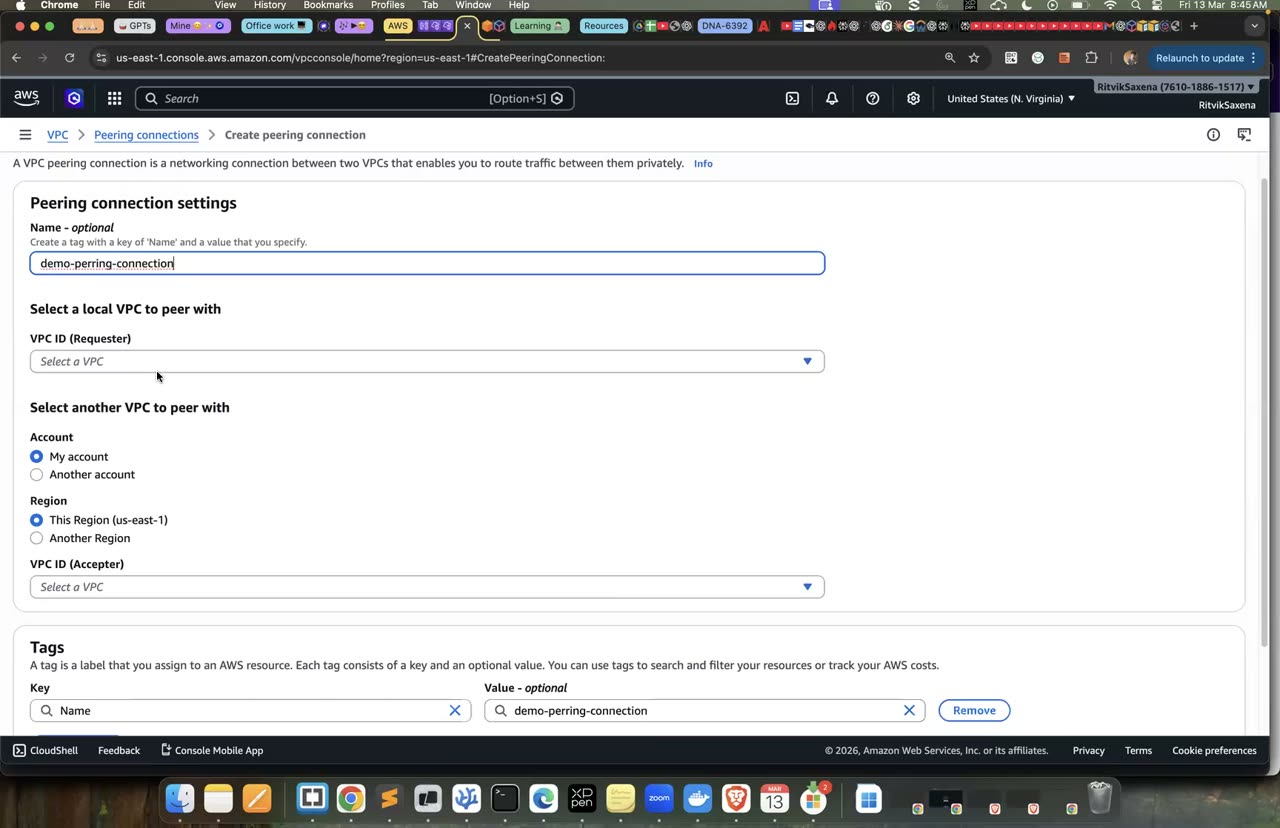
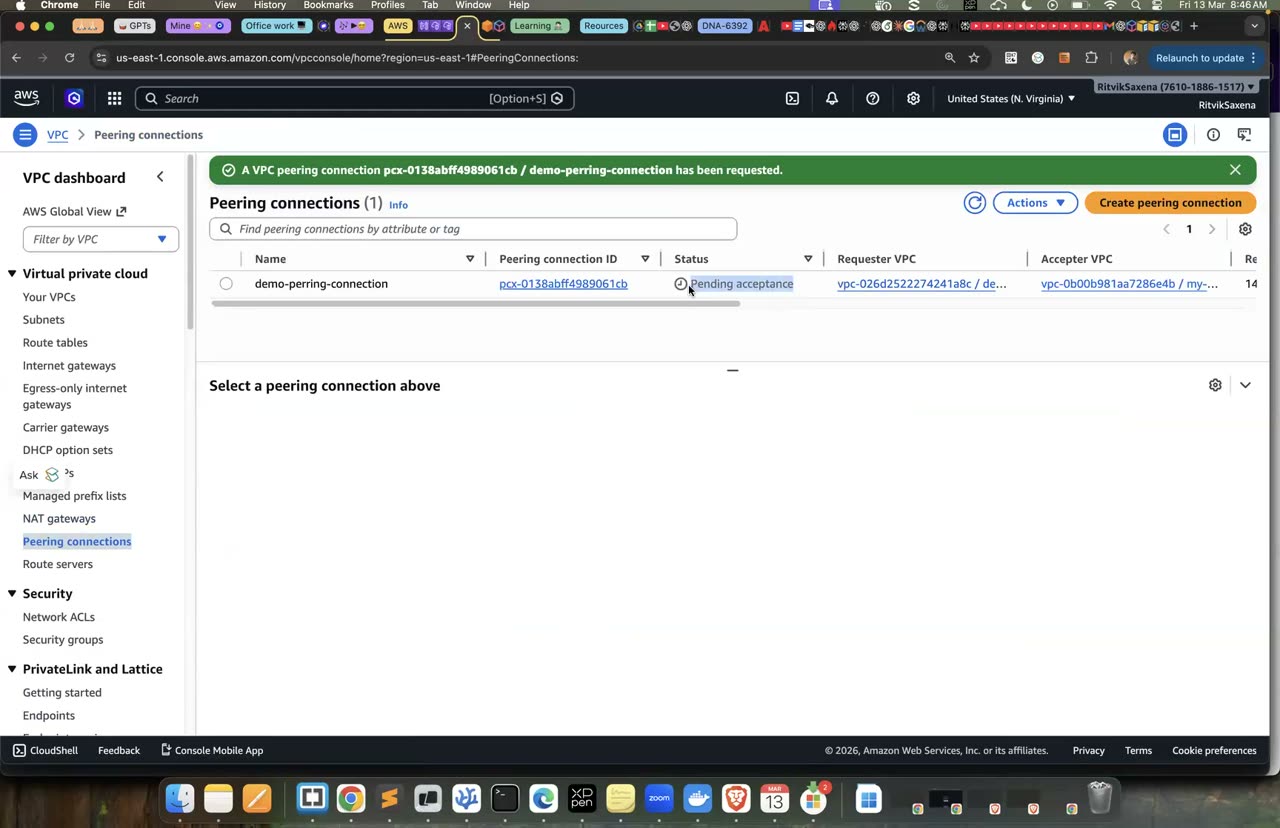
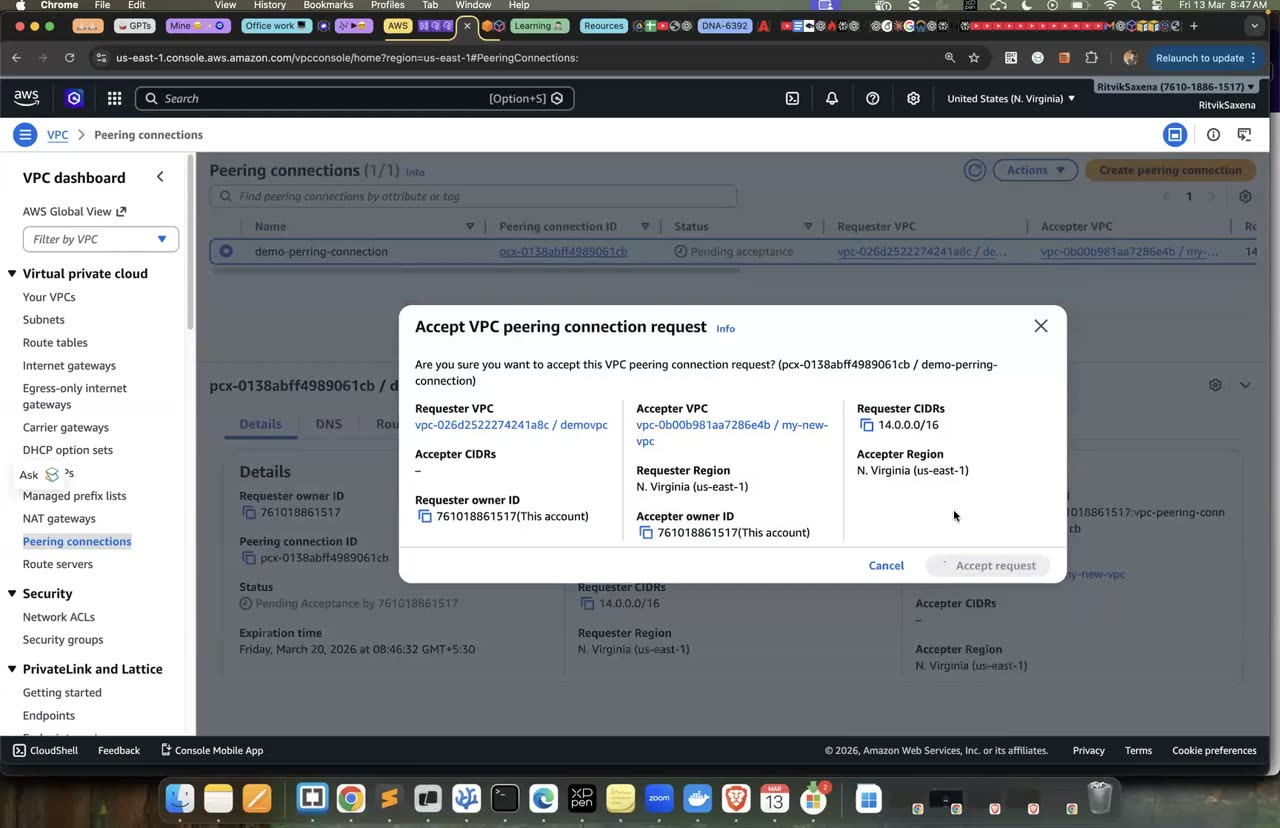
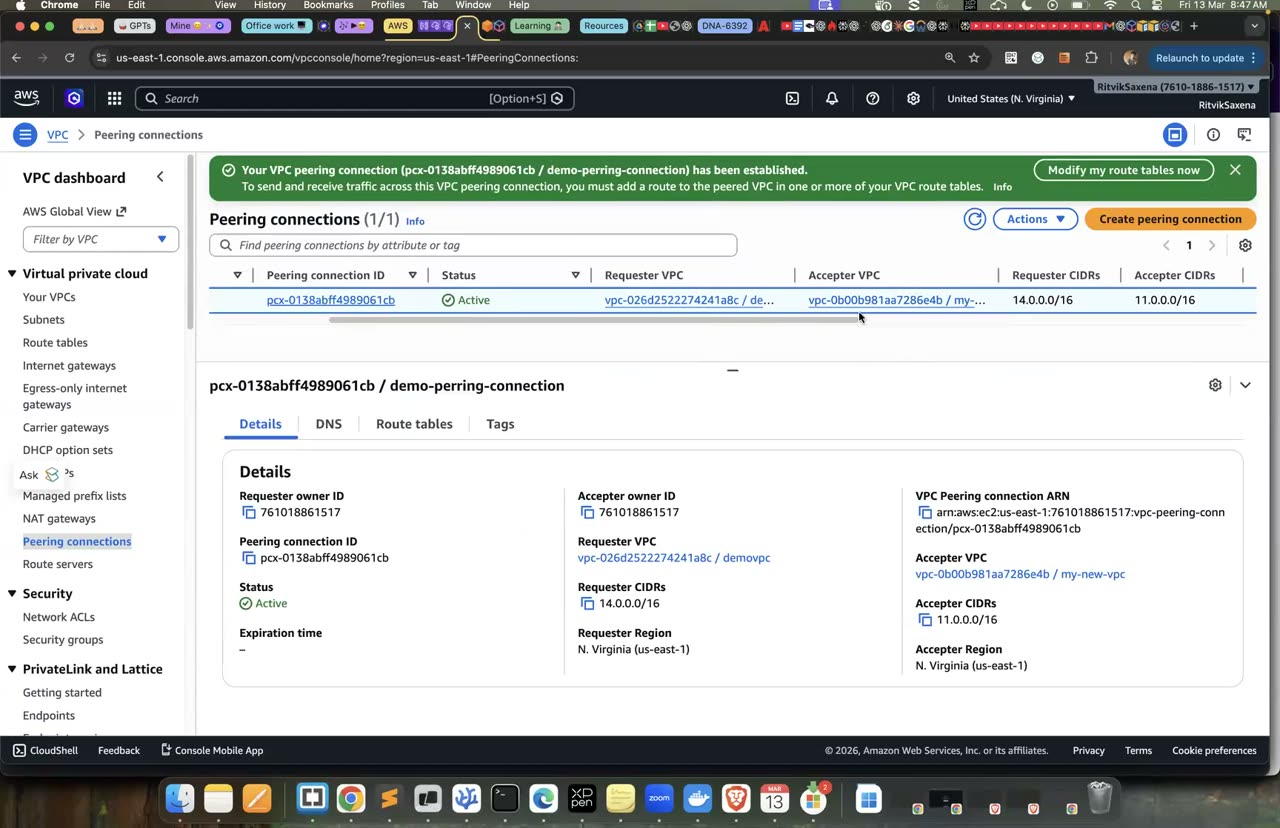
Peering connection request banake accept karna — wahi console, is lab mein 3 VPCs ke beech.
Neeche ki commands vpcb aur vpcc ke beech bhi ek peering banati hain aur uske routes jodti hain. Phir vpca ki route table mein ek route joda jaata hai jo kehta hai "vpcc (172.16.0.0/16) ke liye B wale peering se jao":
# vpcc ko bhi B se peer karo
PCX_BC=$(aws ec2 create-vpc-peering-connection --vpc-id $vpcb_VPC --peer-vpc-id $vpcc_VPC \
  --query VpcPeeringConnection.VpcPeeringConnectionId --output text)
aws ec2 accept-vpc-peering-connection --vpc-peering-connection-id $PCX_BC >/dev/null
aws ec2 create-route --route-table-id $vpcb_RT --destination-cidr-block 172.16.0.0/16 --vpc-peering-connection-id $PCX_BC
aws ec2 create-route --route-table-id $vpcc_RT --destination-cidr-block 10.2.0.0/16 --vpc-peering-connection-id $PCX_BC
# A ko bolo "C ke liye B wale peering se jao"
aws ec2 create-route --route-table-id $vpca_RT --destination-cidr-block 172.16.0.0/16 --vpc-peering-connection-id $PCX_AB
Ab vpcb-host se ping <C_IP> chalao; yeh chalega. Lekin vpca-host se ping <C_IP> nahi chalega, jabki route maujood hai. Iski wajah yeh hai ki VPC peering transitive nahi hota: B, A ke traffic ko aage C tak forward nahi karta. Agar 10 VPCs ko aapas mein poori tarah peer karna ho, toh 45 connections aur 90 routes lagenge, aur isi problem ko hal karne ke liye Transit Gateway banaya gaya hai.
Part G ke liye saaf shuruaat chahiye, isliye ab saare peering routes aur connections hata do:
aws ec2 delete-route --route-table-id $vpca_RT --destination-cidr-block 10.2.0.0/16
aws ec2 delete-route --route-table-id $vpca_RT --destination-cidr-block 172.16.0.0/16
aws ec2 delete-route --route-table-id $vpcb_RT --destination-cidr-block 10.1.0.0/16
aws ec2 delete-route --route-table-id $vpcb_RT --destination-cidr-block 172.16.0.0/16
aws ec2 delete-route --route-table-id $vpcc_RT --destination-cidr-block 10.2.0.0/16
aws ec2 delete-vpc-peering-connection --vpc-peering-connection-id $PCX_AB
aws ec2 delete-vpc-peering-connection --vpc-peering-connection-id $PCX_BC- B se C tak ping chala, lekin A se C tak (B ke through) fail hua. Tumne khud dekha ki peering non-transitive hai.
- Saare peerings aur unke routes delete ho gaye.
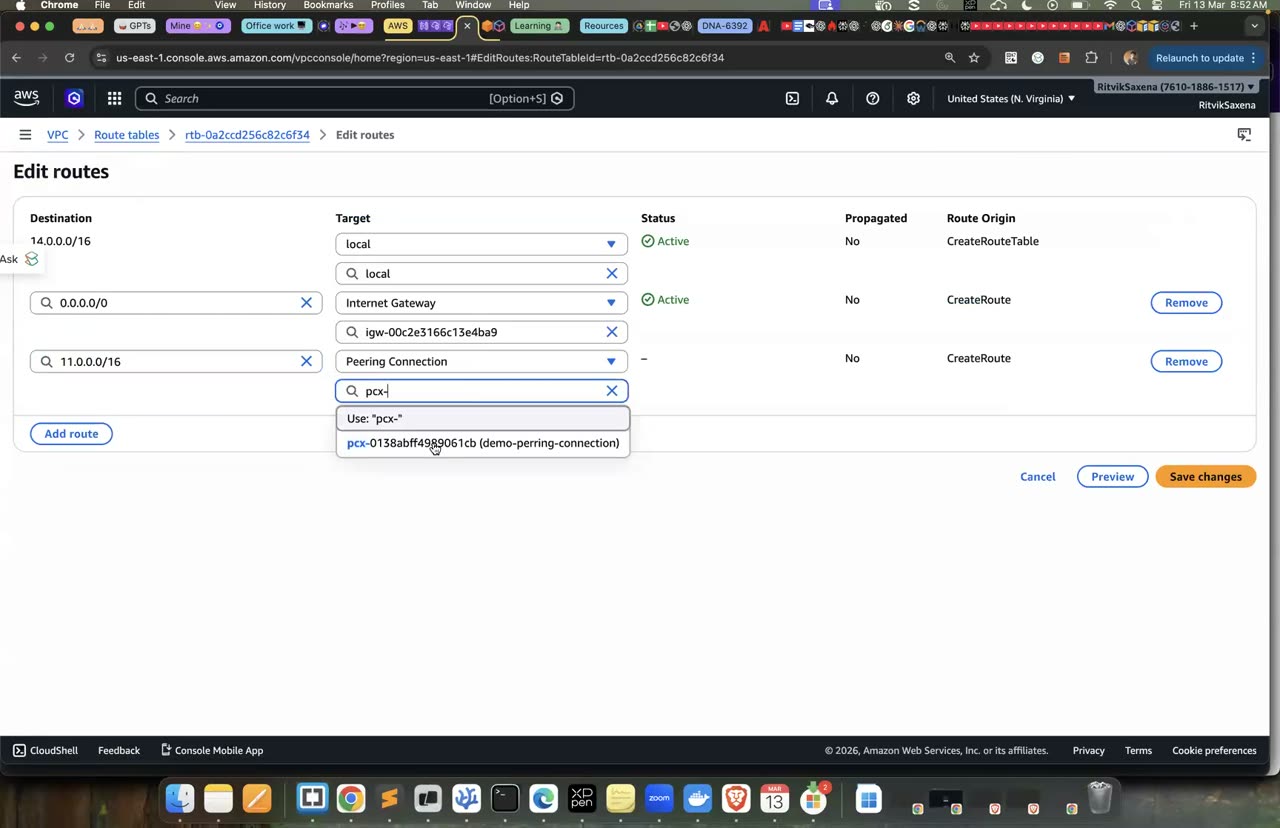
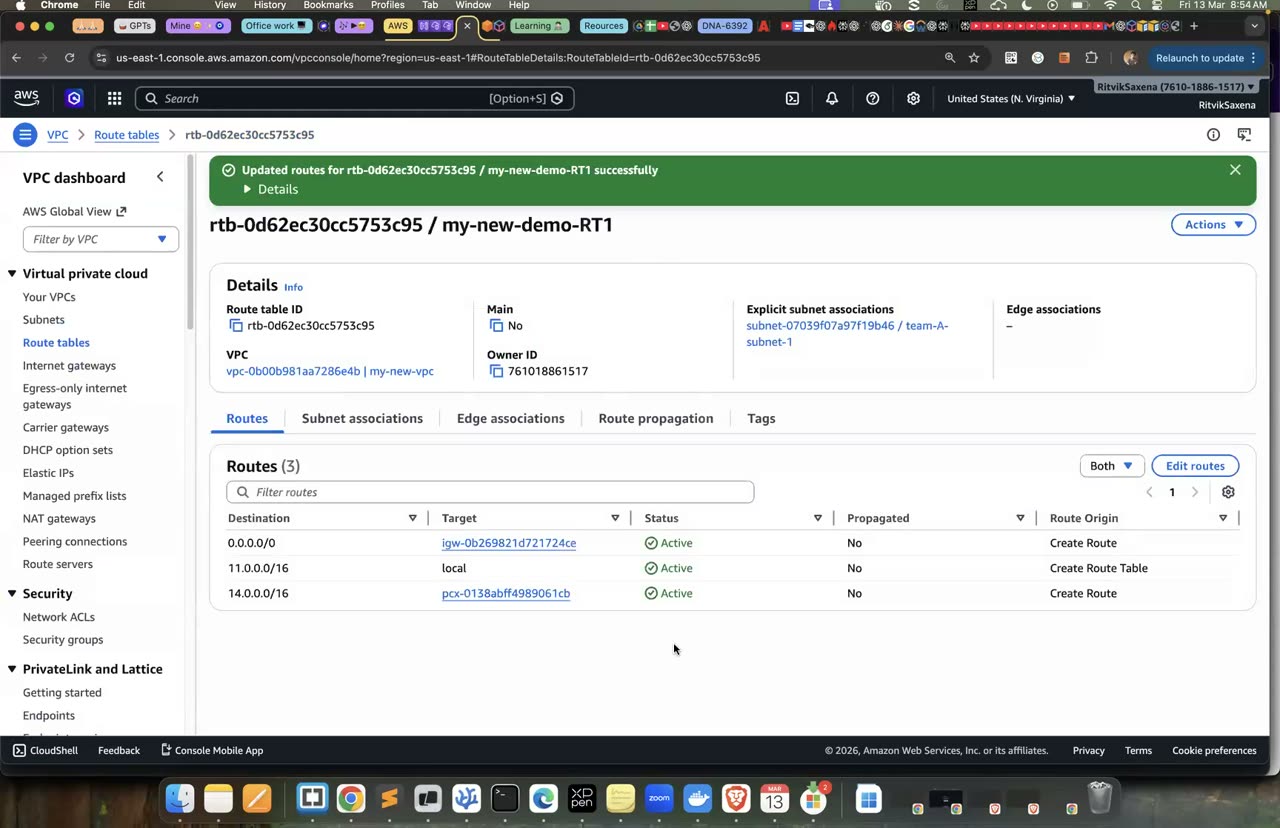
Route table mein peering connection add karna — non-transitive isi wajah se hota hai.
G Transit Gateway (hub-and-spoke)
Har TGW attachment ka lagbhag $0.05 per hour lagta hai, aur data processing ka alag charge hai. 3 attachments ka kharcha lagbhag $0.15 per hour hoga. Part G aur Part H ko saath milake 1.5–2 ghante mein khatam kar lo.
Neeche ki commands ek Transit Gateway banati hain jisme default route table mein attachments apne aap jud jaate hain aur apne CIDR khud propagate karte hain, aur uske available hone ka intezaar karti hain. Phir teeno VPCs ko TGW se attach kiya jaata hai aur teeno attachments ke available hone ka intezaar kiya jaata hai. Aakhir mein har VPC ki route table mein doosre private networks ke liye TGW ka route joda jaata hai:
TGW=$(aws ec2 create-transit-gateway --description deepdive-tgw \
  --options DefaultRouteTableAssociation=enable,DefaultRouteTablePropagation=enable \
  --tag-specifications 'ResourceType=transit-gateway,Tags=[{Key=Name,Value=deepdive-tgw},{Key=Project,Value=deepdive}]' \
  --query TransitGateway.TransitGatewayId --output text); echo $TGW
until [ "$(aws ec2 describe-transit-gateways --transit-gateway-ids $TGW --query 'TransitGateways[0].State' --output text)" = available ]; do sleep 15; echo -n .; done; echo

for v in vpca vpcb vpcc; do
  VPC_VAR=${v}_VPC; SUB_VAR=${v}_SUB
  eval "${v}_ATT=\$(aws ec2 create-transit-gateway-vpc-attachment --transit-gateway-id $TGW \
    --vpc-id \$$VPC_VAR --subnet-ids \$$SUB_VAR --query TransitGatewayVpcAttachment.TransitGatewayAttachmentId --output text)"
done
echo $vpca_ATT $vpcb_ATT $vpcc_ATT
until [ "$(aws ec2 describe-transit-gateway-vpc-attachments --transit-gateway-attachment-ids $vpca_ATT $vpcb_ATT $vpcc_ATT \
  --query 'length(TransitGatewayVpcAttachments[?State==`available`])')" = 3 ]; do sleep 15; echo -n .; done; echo

# Har VPC: "baaki private networks → TGW"
aws ec2 create-route --route-table-id $vpca_RT --destination-cidr-block 10.0.0.0/8     --transit-gateway-id $TGW
aws ec2 create-route --route-table-id $vpca_RT --destination-cidr-block 172.16.0.0/16  --transit-gateway-id $TGW
aws ec2 create-route --route-table-id $vpcb_RT --destination-cidr-block 10.0.0.0/8     --transit-gateway-id $TGW
aws ec2 create-route --route-table-id $vpcb_RT --destination-cidr-block 172.16.0.0/16  --transit-gateway-id $TGW
aws ec2 create-route --route-table-id $vpcc_RT --destination-cidr-block 10.0.0.0/8     --transit-gateway-id $TGW
Tum soch sakte ho ki 10.0.0.0/8 ka route vpca ke apne CIDR (10.1.0.0/16) ko bhi TGW pe bhej dega. Aisa nahi hoga, kyunki VPC ka apna CIDR local route se jaata hai, aur longest prefix match ke niyam se zyada specific route (/16) jeet-ta hai. Isliye 10.0.0.0/8 ko TGW pe bhejna safe hai.
- TGW aur teeno attachments available hain, aur har VPC ki route table mein TGW ke routes hain.
Ab vpca-host se ping -c 2 <B_IP> aur ping -c 2 <C_IP> chalao, aur vpcb-host se C ko ping karo; sab chalenge. Phir neeche ki commands se TGW ki route table dekho:
TGW_RT=$(aws ec2 describe-transit-gateways --transit-gateway-ids $TGW \
  --query 'TransitGateways[0].Options.AssociationDefaultRouteTableId' --output text)
aws ec2 search-transit-gateway-routes --transit-gateway-route-table-id $TGW_RT \
  --filters Name=state,Values=active --query 'Routes[].[DestinationCidrBlock,Type,TransitGatewayAttachments[0].ResourceId]' --output table
Teeno CIDRs propagated type ke hain, yaani har attachment ne apna CIDR khud TGW ki route table mein daala. Agar tumhe segmentation chahiye (jaise dev aur prod aapas mein baat na karein, lekin dono shared-services se baat kar sakein), toh alag-alag TGW route tables banaye jaate hain aur association aur propagation chun-chun ke kiye jaate hain. Yeh tum Challenge mein karoge.
- A↔B, A↔C aur B↔C, teeno ping chal gaye.
- TGW ki route table mein 3 propagated routes hain.
H Site-to-Site VPN with a simulated on-prem router
Ab vpcc (172.16.0.0/16) ko "on-prem data center" maano. Uska TGW attachment hata diya jaayega, aur usme ek Ubuntu instance strongSwan chalayega, jo tumhare office ke VPN router ka kaam karega. AWS ki taraf TGW ke saath ek Site-to-Site VPN banega, jisme internet ke upar do encrypted IPsec tunnels hote hain. Nateeja yeh hoga ki "office" ke server se vpca aur vpcb ke private IPs tak ping jaayega, bilkul ek asli hybrid setup ki tarah. Iska kharcha VPN ka lagbhag $0.05 per hour aur TGW VPN attachment ka lagbhag $0.05 per hour hai.
Neeche ki commands pehle vpcc ka TGW route aur attachment hatati hain. Phir ek security group banaya jaata hai jo IPsec ke ports (UDP 500 aur 4500) aur private networks ka saara traffic allow karta hai, aur usme Ubuntu ka onprem-router instance launch kiya jaata hai. Router doosre servers ka traffic aage bhejega, isliye uska source/dest check band kiya jaata hai. Use ek Elastic IP diya jaata hai taaki uska public IP na badle. Aakhir mein vpcc ki route table mein AWS ke private ranges ke liye router ka raasta joda jaata hai:
aws ec2 delete-route --route-table-id $vpcc_RT --destination-cidr-block 10.0.0.0/8
aws ec2 delete-transit-gateway-vpc-attachment --transit-gateway-attachment-id $vpcc_ATT

UBU_AMI=$(aws ssm get-parameter --name /aws/service/canonical/ubuntu/server/24.04/stable/current/amd64/hvm/ebs-gp3/ami-id \
  --query Parameter.Value --output text)
RTR_SG=$(aws ec2 create-security-group --group-name onprem-router-sg --description "IPsec + onprem traffic" \
  --vpc-id $vpcc_VPC --query GroupId --output text)
aws ec2 authorize-security-group-ingress --group-id $RTR_SG --ip-permissions \
  'IpProtocol=udp,FromPort=500,ToPort=500,IpRanges=[{CidrIp=0.0.0.0/0}]' \
  'IpProtocol=udp,FromPort=4500,ToPort=4500,IpRanges=[{CidrIp=0.0.0.0/0}]' \
  'IpProtocol=-1,IpRanges=[{CidrIp=172.16.0.0/16},{CidrIp=10.0.0.0/8}]'
RTR=$(aws ec2 run-instances --image-id $UBU_AMI --instance-type $TYPE --subnet-id $vpcc_SUB \
  --security-group-ids $RTR_SG --iam-instance-profile Name=deepdive-ec2-role \
  --tag-specifications 'ResourceType=instance,Tags=[{Key=Name,Value=onprem-router},{Key=Project,Value=deepdive}]' \
  --query 'Instances[0].InstanceId' --output text)
aws ec2 wait instance-running --instance-ids $RTR
aws ec2 modify-instance-attribute --instance-id $RTR --no-source-dest-check     # router doosron ka traffic forward karega
EIP_ALLOC=$(aws ec2 allocate-address --query AllocationId --output text)
aws ec2 associate-address --instance-id $RTR --allocation-id $EIP_ALLOC
EIP=$(aws ec2 describe-addresses --allocation-ids $EIP_ALLOC --query 'Addresses[0].PublicIp' --output text); echo "router public IP: $EIP"

# "office" network: AWS ke private ranges ke liye raasta router se
aws ec2 create-route --route-table-id $vpcc_RT --destination-cidr-block 10.0.0.0/8 --instance-id $RTR- vpcc ka attachment delete ho raha hai, onprem-router Elastic IP ke saath chal raha hai, aur uska source/dest check band hai.
Neeche ki commands AWS ko tumhare "office router" ke baare mein batati hain (customer gateway, jisme router ka public IP hota hai). Phir TGW pe ek static-routing wala VPN connection banaya jaata hai aur uske available hone ka intezaar kiya jaata hai; isme kuch minute lagte hain. Uske baad dono tunnels ke outside IPs aur pre-shared keys dikhaye jaate hain. Aakhir mein, kyunki yeh static VPN hai, TGW ki route table mein "172.16.0.0/16 VPN ke raaste jao" wala route haath se joda jaata hai:
CGW=$(aws ec2 create-customer-gateway --type ipsec.1 --public-ip $EIP --bgp-asn 65000 \
  --tag-specifications 'ResourceType=customer-gateway,Tags=[{Key=Name,Value=deepdive-office}]' \
  --query CustomerGateway.CustomerGatewayId --output text)
VPN=$(aws ec2 create-vpn-connection --type ipsec.1 --customer-gateway-id $CGW --transit-gateway-id $TGW \
  --options 'StaticRoutesOnly=true,LocalIpv4NetworkCidr=172.16.0.0/16,RemoteIpv4NetworkCidr=10.0.0.0/8' \
  --query VpnConnection.VpnConnectionId --output text); echo $VPN
until [ "$(aws ec2 describe-vpn-connections --vpn-connection-ids $VPN --query 'VpnConnections[0].State' --output text)" = available ]; do sleep 20; echo -n .; done; echo

aws ec2 describe-vpn-connections --vpn-connection-ids $VPN \
  --query 'VpnConnections[0].Options.TunnelOptions[].[OutsideIpAddress,PreSharedKey]' --output table

# Static VPN ke liye TGW route table mein "172.16.0.0/16 → VPN" route
VPN_ATT=$(aws ec2 describe-transit-gateway-attachments --filters Name=resource-id,Values=$VPN \
  --query 'TransitGatewayAttachments[0].TransitGatewayAttachmentId' --output text)
aws ec2 create-transit-gateway-route --transit-gateway-route-table-id $TGW_RT \
  --destination-cidr-block 172.16.0.0/16 --transit-gateway-attachment-id $VPN_ATT
Tunnel 1 ka OutsideIpAddress aur PreSharedKey copy kar lo. AWS console mein VPC → Site-to-Site VPN → Download configuration mein vendor "Strongswan" chun ke poori config file bhi mil jaati hai; use agle step ki config se compare karna.
- VPN available hai, dono tunnels ke outside IPs aur PSKs mil gaye, aur TGW mein static route jud gaya.
Session Manager se onprem-router mein jao (Ubuntu pe user ssm-user hota hai). Neeche ki commands strongSwan install karti hain aur Linux mein IP forwarding chalu karti hain, taaki router doosre servers ke packets aage bhej sake. Phir router ka Elastic IP, Tunnel 1 ka IP aur uski key variables mein daali jaati hain (angle brackets ki jagah apni values daalo). Uske baad /etc/ipsec.conf mein tunnel ki settings likhi jaati hain: office ka network 172.16.0.0/16 aur AWS ka 10.0.0.0/8, aur wahi encryption settings jo AWS use karta hai. Key ko /etc/ipsec.secrets mein rakha jaata hai, strongSwan restart kiya jaata hai, aur tunnel ka status dekha jaata hai:
sudo apt-get update -y && sudo apt-get install -y strongswan
command -v ipsec || sudo apt-get install -y strongswan-starter     # "ipsec" command isi package mein
echo "net.ipv4.ip_forward=1" | sudo tee /etc/sysctl.d/99-vpn.conf && sudo sysctl -p /etc/sysctl.d/99-vpn.conf

export EIP=<router Elastic IP>
export T1=<Tunnel1 OutsideIpAddress>
export PSK1='<Tunnel1 PreSharedKey>'

sudo tee /etc/ipsec.conf > /dev/null <<EOF
config setup
    charondebug="ike 1, knl 1"

conn aws-tunnel1
    auto=start
    type=tunnel
    keyexchange=ikev1
    authby=psk
    left=%defaultroute
    leftid=$EIP
    leftsubnet=172.16.0.0/16
    right=$T1
    rightsubnet=10.0.0.0/8
    ike=aes128-sha1-modp2048
    esp=aes128-sha1-modp2048
    ikelifetime=8h
    lifetime=1h
    dpddelay=10s
    dpdtimeout=30s
    dpdaction=restart
EOF
echo "$EIP $T1 : PSK \"$PSK1\"" | sudo tee /etc/ipsec.secrets > /dev/null
sudo chmod 600 /etc/ipsec.secrets
sudo ipsec restart
sleep 15
sudo ipsec statusall | grep -E "ESTABLISHED|INSTALLED|aws-tunnel1"
Output mein ESTABLISHED (IKE phase 1) aur INSTALLED (IPsec SA, yaani phase 2) dikhna chahiye. 1–2 minute baad console mein VPN ke Tunnel details dekho: Tunnel 1 UP hoga aur Tunnel 2 DOWN, kyunki humne sirf ek tunnel configure kiya hai. Production mein dono tunnels configure kiye jaate hain, taaki AWS ki maintenance ke waqt bhi connection bana rahe.
ipsec statusallmein ESTABLISHED aur INSTALLED, dono dikh rahe hain.- Console mein Tunnel 1 UP hai.
Router se ping -c 3 <A_IP> aur ping -c 3 <B_IP> chalao. Phir vpcc-host se bhi yahi ping karo; yeh office ka ek normal server hai jo sirf router wale route se bahar jaata hai. Iske packets ka raasta is tarah hoga: vpcc-host se router, router se IPsec tunnel (internet ke upar, encrypted), tunnel se TGW, aur TGW se vpca ya vpcb. Ulti disha (cloud se office) check karne ke liye vpca-host se ping <C_IP> bhi chalao.
Encrypted packets dekhne ke liye router pe neeche wali command chalao, jab doosre Session Manager tab mein ping chal raha ho:
# router pe encrypted packets dekho (doosra Session Manager tab mein ping chalte hue):
sudo tcpdump -ni any esp or udp port 4500 -c 10
CloudWatch mein VPN ke metrics bhi dekho, jaise TunnelState aur TunnelDataIn/Out.
- vpcc-host se A_IP aur B_IP tak ping chala (VPN aur TGW ke through).
- vpca-host se C_IP tak ping chala.
- tcpdump mein ESP ya UDP 4500 ke encrypted packets dikhe.
I Direct Connect, Break & Fix, Challenge, Explain
AWS Direct Connect ek physical, dedicated fiber connection hai jo tumhare data center ya colocation se AWS ki Direct Connect location tak jaata hai, aur yeh kisi partner ya AWS ke saath contract karke milta hai. Isliye ise kisi lab account mein practise karna sambhav nahi hai. Iske mukhya concepts yeh hain: dedicated connections (1, 10 ya 100 Gbps) aur hosted connections; virtual interfaces, jisme private VIF VGW ya DX gateway se judta hai, transit VIF TGW se judta hai, aur public VIF AWS ki public services se; Direct Connect Gateway, jisse ek hi connection se kai regions tak pahuncha ja sakta hai; aur standard pattern "DX primary aur Site-to-Site VPN backup", jisme backup bilkul wahi VPN hota hai jo tumne abhi banaya. VPN aur DX ka farak yeh hai ki VPN internet ke upar encrypted chalta hai, minutes mein ban jaata hai, sasta hai, lekin uski latency badalti rehti hai. DX private hai, uski latency aur bandwidth ek jaisi rehti hai, lekin use banne mein hafte lagte hain, woh mehnga hai, aur default roop se encrypted nahi hota (iske liye MACsec ya DX ke upar VPN chalana padta hai).
aws ec2 modify-instance-attribute --instance-id $RTR --source-dest-check chala ke router ka source/dest check wapas chalu karo. Ab vpcc-host se A_IP ka ping fail hoga, jabki router khud A_IP ko ping kar paayega. Iski wajah yeh hai ki EC2 default roop se sirf apne khud ke IP ka traffic accept karta hai, isliye router aur NAT instances ke liye yeh check band karna padta hai. --no-source-dest-check se ise wapas band kar do.
vpcb ki route table se 172.16.0.0/16 → TGW wala route delete karo. Ab office se B_IP ka ping fail hoga, lekin A_IP ka ping chalta rahega. Ise asymmetric routing kehte hain: request pahunch gayi, lekin reply ke liye koi raasta nahi hai. Route wapas jod do. Hybrid networking ki lagbhag 80% problems inhi teen wajahon se hoti hain: ek taraf route ka na hona, security group ya NACL ki galti, ya CIDRs ka overlap.
Queue ka visibility timeout 5 second rakho, aur function ka timeout 10 second karke (aws lambda update-function-configuration --function-name deepdive-order-worker --timeout 10) event source mapping ko delete karke dobara banane ki koshish karo. AWS mapping banane se mana kar dega, kyunki visibility timeout function ke timeout se kam hai. Lekin apne khud ke consumers (EC2 ya ECS pe) mein aisa koi check nahi hota, aur wahan yahi galti duplicate processing karwati hai: message abhi process ho hi raha hota hai ki timeout khatam ho jaata hai aur woh doosre consumer ko dikh jaata hai. Test ke baad function ka timeout wapas 5 kar do.
Yeh chaar kaam bina steps dekhe karo. 1. TGW segmentation: do TGW route tables banao, shared aur isolated. vpca aur vpcb ko isolated table se associate karo, jisme sirf VPN (office) ka route propagate ho. Nateeja yeh hona chahiye ki A aur B aapas mein baat na kar sakein, lekin dono office se baat kar sakein. 2. strongSwan pe Tunnel 2 bhi configure karo, phir sudo ipsec down aws-tunnel1 se Tunnel 1 band karke failover dekho. Static routing mein iske liye dono tunnels pe policy chahiye hoti hai, jabki BGP wale VPN mein yeh apne aap hota hai. 3. Step Functions mein ek Map state jodo jo ek order ki saari line-items ko parallel mein validate kare, aur workflow ko Express type ke saath compare karo. 4. Multi-region: Lab 4 ka API ap-south-1 mein bhi deploy karo, aur agar tumhare paas domain hai toh Route 53 ke latency-based records se user ko sabse paas wale region se serve karo.
- SQS ka visibility timeout kya hai, aur ise galat set karne ka kya asar hota hai? DLQ kab use karte hain?
- Standard aur FIFO queue mein kya farak hai? SNS ki filter policy kya karti hai?
- Queue, topic aur stream mein kya farak hai? Har ek ka ek example do.
- Step Functions mein Retry aur Catch mein kya farak hai? Standard aur Express mein kya farak hai?
- X-Ray mein trace, segment aur trace map kya hote hain, aur yeh incident ke waqt kaise madad karte hain?
- VPC peering transitive kyun nahi hota, aur Transit Gateway is problem ko kaise hal karta hai?
- Site-to-Site VPN ke components kaunse hain (CGW, VPN connection, tunnels, VGW ya TGW)? Do tunnels kyun hote hain?
- VPN aur Direct Connect mein se kab kaunsa use karoge, aur dono ko saath kyun rakha jaata hai?
- VPN:
aws ec2 delete-vpn-connection --vpn-connection-id $VPNchalao, aur VPN delete hone ke baadaws ec2 delete-customer-gateway --customer-gateway-id $CGWchalao. - Router:
aws ec2 terminate-instances --instance-ids $RTRchalao, aur terminate hone ke baadaws ec2 release-address --allocation-id $EIP_ALLOCse Elastic IP chhod do. - TGW:
$vpca_ATTaur$vpcb_ATTke liyeaws ec2 delete-transit-gateway-vpc-attachmentchalao, aur attachments delete hone ke baadaws ec2 delete-transit-gateway --transit-gateway-id $TGWchalao. - VPCs:
aws ec2 terminate-instances --instance-ids $vpca_IID $vpcb_IID $vpcc_IIDchalao. Phir console meinvpca,vpcbaurvpccko Delete VPC se hatao; isse subnets, IGW, route tables aur SGs bhi saath mein delete ho jaate hain. Agar "network interfaces still in use" error aaye, toh 2 minute ruk ke dobara koshish karo. - Kinesis/Firehose: Firehose stream delete karo, phir
aws kinesis delete-stream --stream-name deepdive-clickschalao, aur bucketdeepdive-stream-...khaali karke delete karo. - Step Functions: state machine, Lambda
deepdive-validate-order, tabledeepdive-sfn-orders, topicdeepdive-order-confirmed, aur rolesdeepdive-sfn-roleaurdeepdive-validate-roledelete karo. - SQS/SNS/Lambda: pehle event source mapping delete karo (
aws lambda list-event-source-mappings --function-name deepdive-order-workerse UUID nikaalo aurdelete-event-source-mapping --uuidchalao). Phir Lambdadeepdive-order-worker, queuesdeepdive-orders,deepdive-orders-dlq,deepdive-payments.fifo,deepdive-billingaurdeepdive-shipping, topicdeepdive-order-events, aur roledeepdive-sqs-worker-roledelete karo. - Aakhri jaanch: VPC console mein Transit gateways, Site-to-Site VPN aur Elastic IPs, teeno khaali hone chahiye.