Disaster recovery: EC2 ko doosre region mein wapas lao
us-east-1 'down' ho gaya — server ko Mumbai mein backup se khada karo aur RTO/RPO naapo.
Ek insurance company ka "policy portal" us-east-1 mein ek EC2 server pe chalta hai. Regulator ne naya niyam banaya hai: "agar poora region band ho jaaye, tab bhi service 4 ghante ke andar wapas chalu honi chahiye (RTO ≤ 4 ghante), aur 24 ghante se zyada ka data nahi khona chahiye (RPO ≤ 24 ghante)." Tumhe ek backup strategy banani hai, backup ki ek copy Mumbai (ap-south-1) mein rakhni hai, aur ek DR drill karke asli RTO aur RPO naap ke report deni hai.
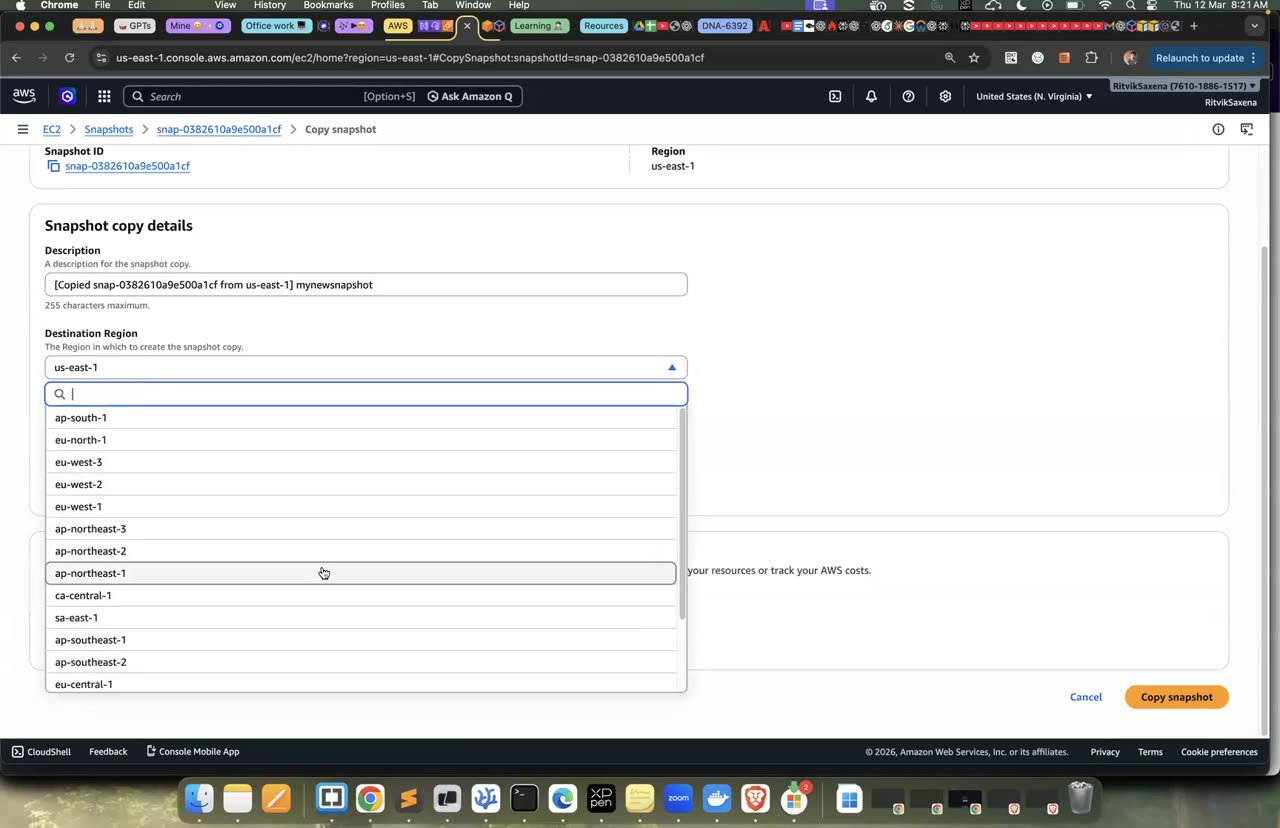
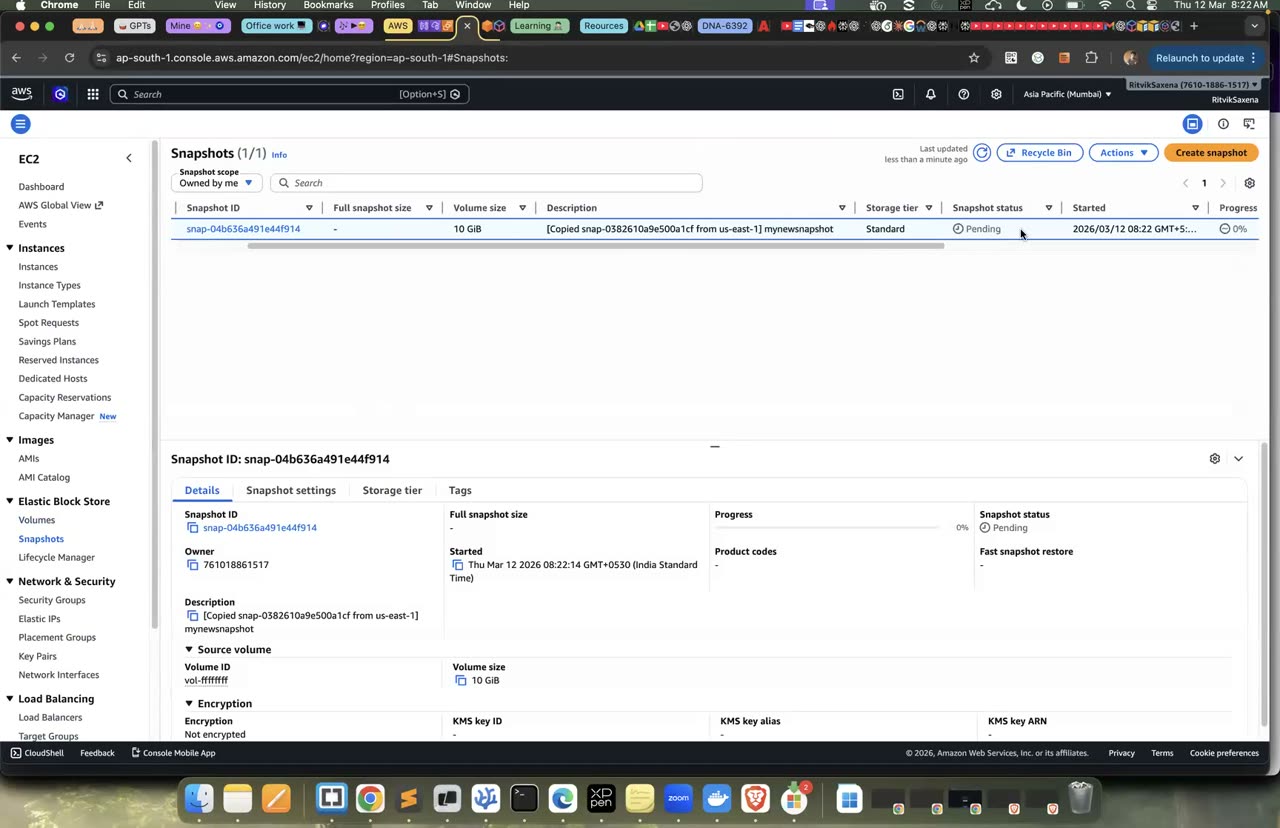
Snapshot copy ka console — cross-region AMI copy bhi isi tarah hota hai.
- us-east-1 mein ek web server chahiye, jiski disk pe "business data" ho, yaani ek aisi file jo har minute update hoti hai.
- Server ki AMI banake use ap-south-1 mein copy karni hai. Phir region ko "down" maan ke Mumbai mein server khada karna hai aur uska page browser mein kholna hai.
- Yahi kaam AWS Backup se bhi karna hai: backup job, cross-region copy aur restore.
- Ek report deni hai jisme RTO (disaster declare hone se Mumbai mein page khulne tak ka samay), RPO (restore hua data kitna purana tha) aur monthly kharche ka andaaza ho.
aws ec2 create-imageAMI aur EBS snapshots banata hai.aws ec2 copy-image --source-regionuse doosre region mein copy karta hai, aur yeh command destination region mein chalayi jaati hai.- Mumbai mein security group alag se banana padega, kyunki SGs har region ke alag hote hain.
- AWS Backup ko pehli baar use karne pe console ek default service role bana deta hai.
Guided solution dekho (pehle khud try karo!)
Pehle folder banta hai aur us-east-1 ki AMI ID nikaali jaati hai. Phir portal-userdata.sh likhi jaati hai, jo server pe nginx install karti hai aur ek chhoti heartbeat.sh script banati hai. Yeh script web page mein "Last business write" ke saath us waqt ka samay likh deti hai. Ek systemd timer is script ko boot ke 10 second baad aur phir har minute chalata hai, taaki page ka timestamp lagataar badalta rahe. Yahi hamara "business data" hai.
Uske baad default VPC mein portal-sg banta hai, jo port 80 kholta hai. Server is user-data ke saath launch hota hai, aur uska public IP print kiya jaata hai.
export TYPE=t3.micro
mkdir -p ~/deepdive/scn10 && cd ~/deepdive/scn10
AMI_E=$(aws ssm get-parameter --region us-east-1 --name /aws/service/ami-amazon-linux-latest/al2023-ami-kernel-default-x86_64 --query Parameter.Value --output text)
cat > portal-userdata.sh <<'EOF'
#!/bin/bash
dnf install -y nginx
cat > /usr/local/bin/heartbeat.sh <<'SH'
#!/bin/bash
echo "<h1>Policy Portal</h1><p>Last business write: $(date -u +%FT%TZ)</p><p>Served by: $(hostname)</p>" > /usr/share/nginx/html/index.html
SH
chmod +x /usr/local/bin/heartbeat.sh
cat > /etc/systemd/system/heartbeat.service <<'UNIT'
[Unit]
Description=write business data
[Service]
Type=oneshot
ExecStart=/usr/local/bin/heartbeat.sh
UNIT
cat > /etc/systemd/system/heartbeat.timer <<'UNIT'
[Unit]
Description=every minute
[Timer]
OnBootSec=10
OnUnitActiveSec=60
[Install]
WantedBy=timers.target
UNIT
systemctl daemon-reload
systemctl enable --now nginx heartbeat.timer
EOF
VPC_E=$(aws ec2 describe-vpcs --region us-east-1 --filters Name=isDefault,Values=true --query 'Vpcs[0].VpcId' --output text)
SG_E=$(aws ec2 create-security-group --region us-east-1 --vpc-id $VPC_E --group-name portal-sg --description portal --query GroupId --output text)
aws ec2 authorize-security-group-ingress --region us-east-1 --group-id $SG_E --protocol tcp --port 80 --cidr 0.0.0.0/0 >/dev/null
PRIMARY=$(aws ec2 run-instances --region us-east-1 --image-id $AMI_E --instance-type $TYPE --security-group-ids $SG_E \
  --iam-instance-profile Name=deepdive-ec2-role --user-data file://portal-userdata.sh \
  --tag-specifications 'ResourceType=instance,Tags=[{Key=Name,Value=policy-portal},{Key=Project,Value=deepdive-scn10}]' \
  --query 'Instances[0].InstanceId' --output text)
aws ec2 wait instance-running --region us-east-1 --instance-ids $PRIMARY
P_IP=$(aws ec2 describe-instances --region us-east-1 --instance-ids $PRIMARY --query 'Reservations[0].Instances[0].PublicIpAddress' --output text)
echo "http://$P_IP (2 min baad; har minute timestamp badlega)"Yeh block pehle backup shuru hone ka samay note karta hai. Phir chalte hue server ki AMI banata hai (bina reboot ke) aur uske available hone ka intezaar karta hai. Uske baad Mumbai region mein copy-image chala ke AMI ki copy banayi jaati hai, aur uske tayyar hone ka intezaar kiya jaata hai; isme lagbhag 5–15 minute lagte hain.
BACKUP_TIME=$(date -u +%FT%TZ); echo "backup started $BACKUP_TIME"
AMI_BKP=$(aws ec2 create-image --region us-east-1 --instance-id $PRIMARY --name "policy-portal-$(date +%Y%m%d-%H%M)" \
  --no-reboot --tag-specifications 'ResourceType=image,Tags=[{Key=Project,Value=deepdive-scn10}]' --query ImageId --output text)
aws ec2 wait image-available --region us-east-1 --image-ids $AMI_BKP
AMI_DR=$(aws ec2 copy-image --region ap-south-1 --source-region us-east-1 --source-image-id $AMI_BKP \
  --name "policy-portal-dr-$(date +%Y%m%d-%H%M)" --query ImageId --output text)
aws ec2 wait image-available --region ap-south-1 --image-ids $AMI_DR       # ~5-15 min
echo "DR AMI ready in Mumbai: $AMI_DR"- us-east-1 mein: instance select karo → Actions → Image and templates → Create image — naam do, "No reboot" tick karo, Create image.
- AMI available hone ke baad: AMI select karo → Actions → Copy AMI — Destination region Asia Pacific (Mumbai) chuno, Copy AMI dabao.
--no-reboot ka matlab hai ki server band nahi hota, lekin tab filesystem sirf "crash-consistent" hota hai, bilkul waisa jaisa bijli jaane ke baad hota hai. Databases ke liye app-consistent backups (jisme pehle app ko rok ke ya pre-scripts chala ke backup liya jaata hai) behtar hote hain.
Snapshot ko doosre region mein copy karna — AMI ke liye bhi Copy AMI ka wahi tareeka hai.
Yeh block disaster declare karne ka samay note karta hai aur primary server ko stop kar deta hai, jaise region chala gaya ho. Phir Mumbai ke default VPC mein naya portal-sg banta hai (port 80 ke saath), aur Mumbai wali AMI se DR server launch hota hai. Server chalu hone ke baad uska public IP nikaala jaata hai, aur page khulne tak har 5 second mein check kiya jaata hai. Page khulte hi disaster se ab tak laga samay (RTO ka launch wala hissa) print hota hai, aur page dikhaya jaata hai.
DISASTER=$(date +%s); echo "disaster declared $(date -u +%FT%TZ)"
aws ec2 stop-instances --region us-east-1 --instance-ids $PRIMARY >/dev/null     # region "gaya"

VPC_M=$(aws ec2 describe-vpcs --region ap-south-1 --filters Name=isDefault,Values=true --query 'Vpcs[0].VpcId' --output text)
SG_M=$(aws ec2 create-security-group --region ap-south-1 --vpc-id $VPC_M --group-name portal-sg --description portal --query GroupId --output text)
aws ec2 authorize-security-group-ingress --region ap-south-1 --group-id $SG_M --protocol tcp --port 80 --cidr 0.0.0.0/0 >/dev/null
DR=$(aws ec2 run-instances --region ap-south-1 --image-id $AMI_DR --instance-type $TYPE --security-group-ids $SG_M \
  --tag-specifications 'ResourceType=instance,Tags=[{Key=Name,Value=policy-portal-dr},{Key=Project,Value=deepdive-scn10}]' \
  --query 'Instances[0].InstanceId' --output text)
aws ec2 wait instance-running --region ap-south-1 --instance-ids $DR
DR_IP=$(aws ec2 describe-instances --region ap-south-1 --instance-ids $DR --query 'Reservations[0].Instances[0].PublicIpAddress' --output text)
until curl -s -m 3 http://$DR_IP/ >/dev/null; do sleep 5; done
echo "RTO (launch part): $(( $(date +%s) - DISASTER )) seconds"
curl -s http://$DR_IP/
Page pe pehli baar dikha "Last business write" ka timestamp dekho. Yeh lagbhag AMI banne ke samay ka hoga, aur RPO disaster ke samay aur is timestamp ke beech ka farak hai. Timer chalu hote hi naya timestamp likhne lagta hai, isliye pehli baar wali value note kar lena, ya restore hote hi turant curl chalana. Dhyan do ki DR instance pe deepdive-ec2-role nahi diya gaya hai; IAM global hai, isliye chaaho toh woh bhi de sakte ho.
- us-east-1 mein AWS Backup kholo, Protected resources → Create on-demand backup chuno. Resource type mein EC2 aur instance
policy-portalchuno (primary stopped hai, phir bhi chalega), vault Default aur IAM role Default role chuno, aur Create karo. Job poora hone do; isme lagbhag 5–10 minute lagte hain. - Backup vaults → Default mein recovery point select karo, Actions → Copy chuno, destination region Asia Pacific (Mumbai) aur vault Default chuno, aur Copy karo.
- Mumbai region pe switch karo, AWS Backup → Backup vaults → Default mein copy hua recovery point kholo, aur Restore dabao. Instance type t3.micro, default VPC aur SG
portal-sgchuno, aur Restore karo.
Production mein yeh sab ek Backup plan se hota hai, jaise "har din raat 2 baje backup lo, use 35 din rakho, aur Mumbai mein uski copy 90 din rakho". Resources tags se chune jaate hain (jaise Backup=daily), aur Vault Lock se backups ko delete hone se bachaya jaata hai, jo ransomware se suraksha deta hai.
✓ Verification tests + report
Apni report is table ke format mein likho:
| Metric | Tumhari value | Target |
|---|---|---|
| RPO (data loss) | Disaster ke samay aur restore hue page ke aakhri timestamp ke beech ka farak. | ≤ 24 ghante |
| RTO (downtime) | Disaster se Mumbai mein page khulne tak ka samay, aur saath mein DNS switch ka samay. | ≤ 4 ghante |
| Monthly cost | Snapshot ke GB × lagbhag $0.05 × 2 regions, aur cross-region copy ka lagbhag $0.02 per GB. | — |
- AMI copy wale raaste se Mumbai mein restore hue server ka page browser mein khula.
- AWS Backup ka recovery point Mumbai ke vault mein copy hua aur restore bhi hua.
- Report mein RTO aur RPO ke numbers aur kharche ka andaaza hai.
DR ki chaar mukhya strategies hain. Neeche jaate hue kharcha badhta hai aur RTO aur RPO kam hote jaate hain:
| Strategy | Kya chalta rehta hai DR region mein | RTO / RPO | Cost |
|---|---|---|---|
| Backup & restore | Sirf backups rakhe jaate hain; tumne yahi kiya. | Ghante / ghante | $ |
| Pilot light | Core data live replicate hota hai (jaise DB replica), lekin servers band rehte hain. | Das-bees minute / kuch minute | $$ |
| Warm standby | Poore system ka ek chhota version hamesha chalta rehta hai. | Kuch minute / kuch second | $$$ |
| Multi-site active/active | Dono regions poora traffic sambhalte hain. | Lagbhag 0 / lagbhag 0 | $$$$ |
DNS cutover ke liye Route 53 ke failover records (Lab 4 ka F3) primary region ke health check ke aadhar pe traffic ko DR ke IP ya ALB pe switch karte hain. Is switch ka samay bhi RTO mein jodna chahiye.
AMI ki jagah sirf EBS snapshot ko Mumbai copy karo aur usse "server" banane ki koshish karo. Tum dekhoge ki snapshot se sirf volume banta hai, instance nahi; boot karne ke liye AMI chahiye, jo register-image se banti hai. Saath hi, agar source volume customer-managed KMS key se encrypted ho, toh copy karte waqt Mumbai region ki KMS key deni padti hai, kyunki KMS keys har region ki alag hoti hain.
Ek pilot light setup banao. Primary region mein RDS PostgreSQL chalao aur Mumbai mein uska cross-region read replica banao. DR drill mein replica ko promote karo aur restore hue app server ko uske endpoint se jodo. Phir RTO aur RPO dobara naapo aur backup-restore wale tareeke se compare karo.
Yeh commands dono regions ke instances terminate karti hain. Phir dono regions mein policy-portal naam se shuru hone wali har AMI dhoondhti hain, uske snapshots ki list nikaalti hain, AMI ko deregister karti hain aur uske snapshots delete karti hain:
aws ec2 terminate-instances --region us-east-1  --instance-ids $PRIMARY >/dev/null
aws ec2 terminate-instances --region ap-south-1 --instance-ids $DR >/dev/null
for R in us-east-1 ap-south-1; do
  for IMG in $(aws ec2 describe-images --region $R --owners self --filters Name=name,Values='policy-portal*' --query 'Images[].ImageId' --output text); do
    SNAPS=$(aws ec2 describe-images --region $R --image-ids $IMG --query 'Images[0].BlockDeviceMappings[].Ebs.SnapshotId' --output text)
    aws ec2 deregister-image --region $R --image-id $IMG
    for S in $SNAPS; do aws ec2 delete-snapshot --region $R --snapshot-id $S; done
    echo "deleted $IMG ($R)"
  done
done
AWS Backup mein dono regions ke Default vault se recovery points Delete karo, aur AWS Backup ke restore se Mumbai mein bana instance terminate karo. Dono regions ke portal-sg security groups delete karo. Aakhir mein dono regions mein EC2 → Snapshots khol ke confirm karo ki woh khaali hain.