Highly available auto-scaling web app + blue/green
Load test se auto-scaling trigger karo, ek AZ 'gira' do, aur zero-downtime blue/green release karo.
Ek e-commerce site pe har Friday ki sale mein traffic 10 guna ho jaata hai aur site gir jaati hai. Iske liye ek naya design chahiye. Isme kam se kam 2 servers alag-alag AZs mein hone chahiye. Traffic badhne pe servers apne aap badhne chahiye (scale-out) aur ghatne pe kam hone chahiye (scale-in). Ek poora AZ down ho jaaye, tab bhi site chalni chahiye. Aur naya version zero downtime ke saath release hona chahiye: pehle 10% users pe (canary), sab theek rahe toh 100% pe, aur problem ho toh ek click mein rollback.
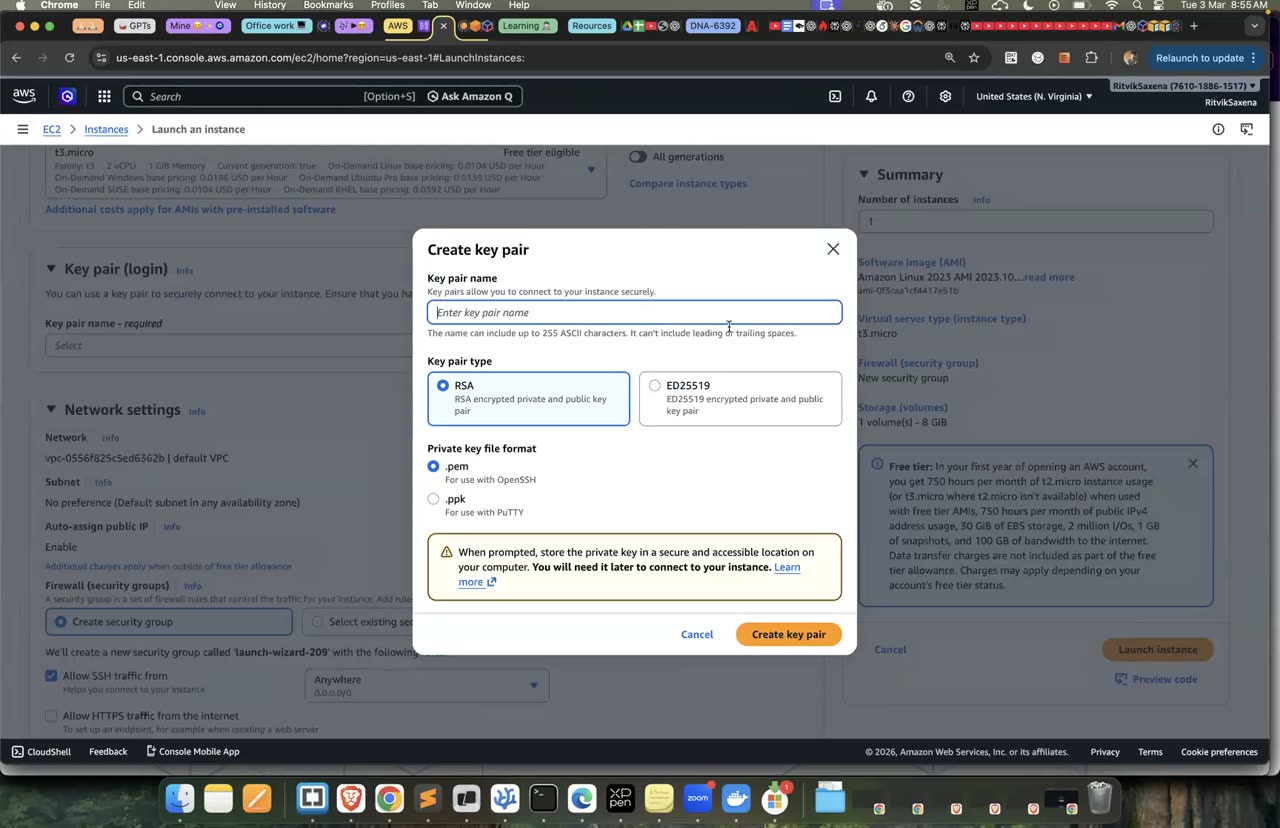
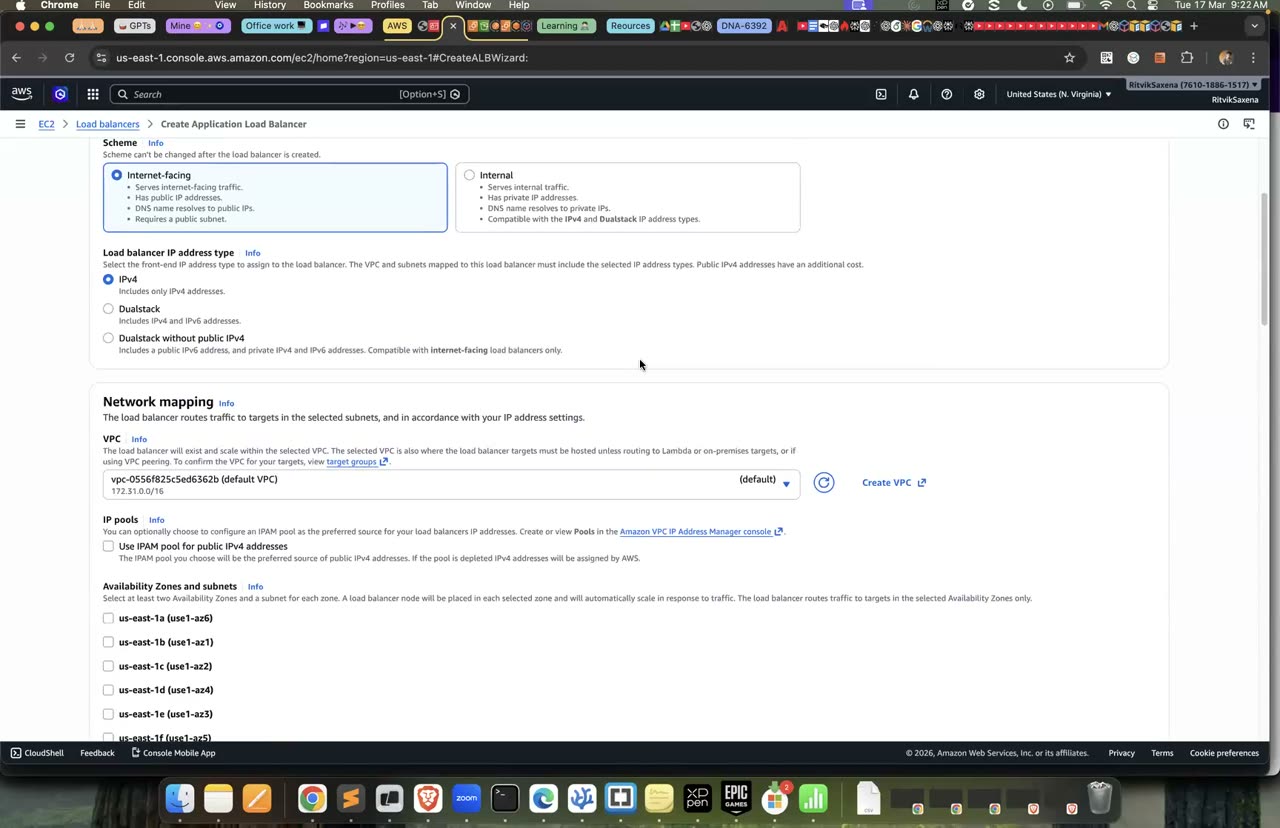
Key pair/SG aur ALB ka console — poore steps 'Guided solution' mein hain.
- ALB ke peeche ek Auto Scaling group chahiye, jisme min 2 aur max 6 instances hon aur kam se kam 2 AZs use hon. Instances pe traffic sirf ALB se aana chahiye.
- Load test (
/workendpoint pe) chalane pe ASG khud instances badhaye, aur test band hone pe ghataye. - Ek AZ ke saare instances terminate karne pe bhi site chalti rahe, aur ASG unki jagah naye instances laaye.
- v2 ki release mein traffic 90/10 se 0/100 tak weights se shift ho, aur rollback 100/0 se ho, bina koi request fail hue.
- Launch template mein user-data base64 mein hota hai, jo
base64 < file | tr -d '\n'se banta hai. - Scaling policy ke liye
TargetTrackingScalingaurASGAverageCPUUtilizationuse karo. ASG pe--health-check-type ELBlagao, taaki app band hone pe bhi instance badla jaaye. - Load generator ke liye
brew install heykaro aurhey -z 6m -c 40 http://ALB/workchalao. - Blue/green ke liye ALB listener ka forward action do target groups ko weights ke saath traffic de sakta hai.
Guided solution dekho (pehle khud try karo!)
Pehle default VPC aur uske us-east-1a, 1b aur 1c ke default subnets nikaale jaate hain. Phir do SGs bante hain. ALB ka SG port 80 poori duniya ke liye kholta hai, jabki app ka SG port 80 sirf ALB SG se allow karta hai.
app-v1.sh har instance pe port 80 pe ek Python app chalati hai. App IMDSv2 se apna instance ID aur AZ padhti hai, aur har request pe version, instance aur AZ ko JSON mein lautati hai. /work path pe app jaan-boojh ke 2 lakh baar SHA-256 chalati hai, taaki load test mein CPU badhe. Phir sed se isi file ki ek copy app-v2.sh banti hai, jisme sirf version v2 kar diya jaata hai.
lt_data function Python ki madad se launch template ka JSON banata hai: AMI, instance type, SG, role, IMDSv2 ki zaroorat, base64 mein user-data aur tags. Aakhir mein ha-web launch template ka version 1 (v1 app) aur version 2 (v2 app) banaye jaate hain.
export AWS_DEFAULT_REGION=us-east-1 TYPE=t3.micro
mkdir -p ~/deepdive/scn8 && cd ~/deepdive/scn8
AMI_ID=$(aws ssm get-parameter --name /aws/service/ami-amazon-linux-latest/al2023-ami-kernel-default-x86_64 --query Parameter.Value --output text)
VPC=$(aws ec2 describe-vpcs --filters Name=isDefault,Values=true --query 'Vpcs[0].VpcId' --output text)
SUBNETS=$(aws ec2 describe-subnets --filters Name=vpc-id,Values=$VPC Name=default-for-az,Values=true \
  Name=availability-zone,Values=us-east-1a,us-east-1b,us-east-1c --query 'Subnets[].SubnetId' --output text)
echo $SUBNETS

ALB_SG=$(aws ec2 create-security-group --vpc-id $VPC --group-name ha-alb-sg --description "ALB" --query GroupId --output text)
APP_SG=$(aws ec2 create-security-group --vpc-id $VPC --group-name ha-app-sg --description "app" --query GroupId --output text)
aws ec2 authorize-security-group-ingress --group-id $ALB_SG --protocol tcp --port 80 --cidr 0.0.0.0/0 >/dev/null
aws ec2 authorize-security-group-ingress --group-id $APP_SG --protocol tcp --port 80 --source-group $ALB_SG >/dev/null

cat > app-v1.sh <<'EOF'
#!/bin/bash
cat > /opt/app.py <<'PY'
import hashlib
import json
import urllib.request
from http.server import BaseHTTPRequestHandler, ThreadingHTTPServer

VERSION = "v1"


def meta(path):
    token = urllib.request.urlopen(urllib.request.Request(
        "http://169.254.169.254/latest/api/token", method="PUT",
        headers={"X-aws-ec2-metadata-token-ttl-seconds": "300"}), timeout=2).read().decode()
    return urllib.request.urlopen(urllib.request.Request(
        f"http://169.254.169.254/latest/meta-data/{path}",
        headers={"X-aws-ec2-metadata-token": token}), timeout=2).read().decode()


INSTANCE, AZ = meta("instance-id"), meta("placement/availability-zone")


class Handler(BaseHTTPRequestHandler):
    def do_GET(self):
        if self.path == "/work":                      # CPU-heavy endpoint for load tests
            h = b"x"
            for _ in range(200_000):
                h = hashlib.sha256(h).digest()
        body = json.dumps({"version": VERSION, "instance": INSTANCE, "az": AZ, "path": self.path}).encode()
        self.send_response(200)
        self.send_header("Content-Type", "application/json")
        self.send_header("Content-Length", str(len(body)))
        self.end_headers()
        self.wfile.write(body)

    def log_message(self, *args):
        pass


ThreadingHTTPServer(("0.0.0.0", 80), Handler).serve_forever()
PY
cat > /etc/systemd/system/app.service <<'UNIT'
[Unit]
Description=ha demo app
After=network-online.target
[Service]
ExecStart=/usr/bin/python3 /opt/app.py
Restart=always
[Install]
WantedBy=multi-user.target
UNIT
systemctl daemon-reload && systemctl enable --now app
EOF
sed 's/VERSION = "v1"/VERSION = "v2"/' app-v1.sh > app-v2.sh

lt_data() {  # userdata-file
  python3 - "$AMI_ID" "$TYPE" "$APP_SG" "$1" <<'PYEOF'
import base64, json, sys
ami, itype, sg, ud = sys.argv[1:]
print(json.dumps({"ImageId": ami, "InstanceType": itype, "SecurityGroupIds": [sg],
                  "IamInstanceProfile": {"Name": "deepdive-ec2-role"},
                  "MetadataOptions": {"HttpTokens": "required"},
                  "UserData": base64.b64encode(open(ud, "rb").read()).decode(),
                  "TagSpecifications": [{"ResourceType": "instance",
                                         "Tags": [{"Key": "Project", "Value": "deepdive-scn8"}]}]}))
PYEOF
}
aws ec2 create-launch-template --launch-template-name ha-web --launch-template-data "$(lt_data app-v1.sh)" >/dev/null
aws ec2 create-launch-template-version --launch-template-name ha-web --source-version 1 \
  --launch-template-data "$(lt_data app-v2.sh)" --query LaunchTemplateVersion.VersionNumber   # 2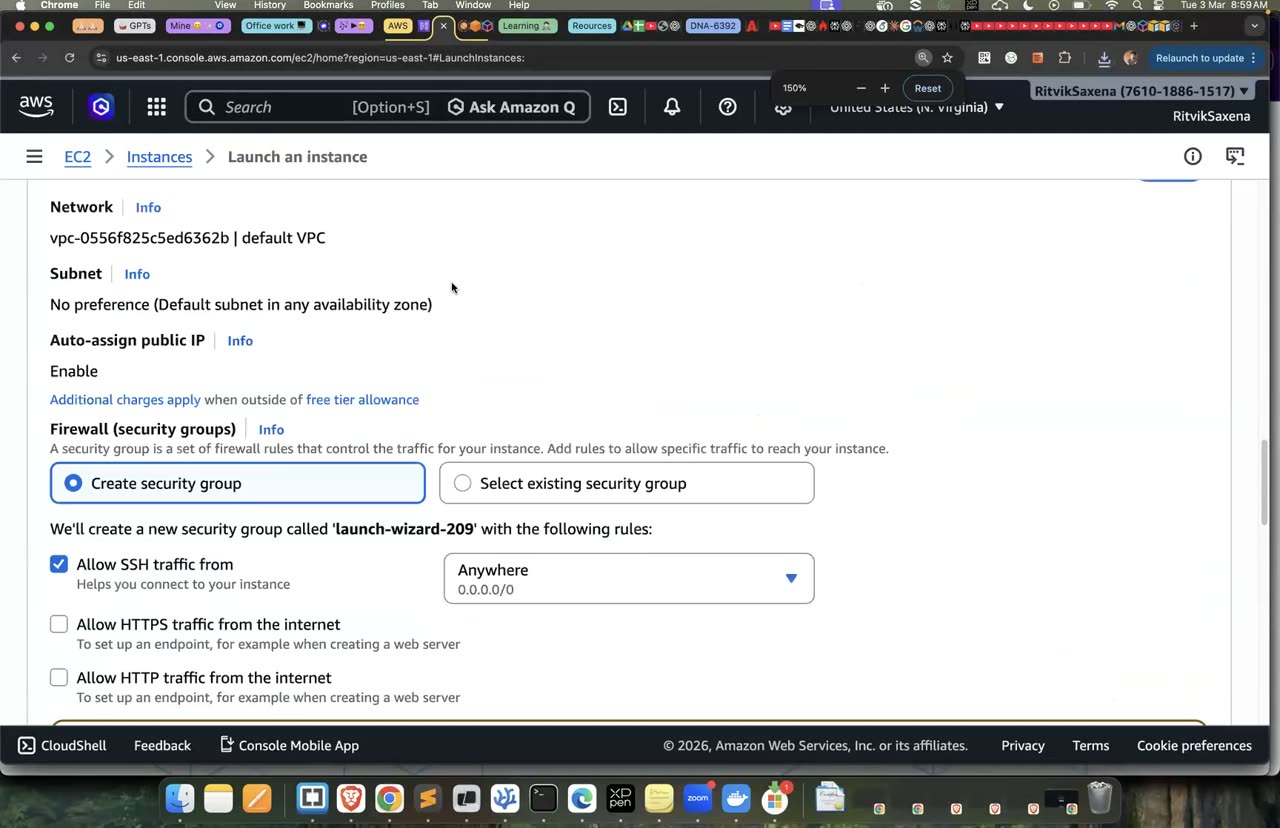
Key pair aur security group — launch template ke liye yeh dono chahiye honge.
Pehle "blue" target group banta hai, jiska health check har 10 second mein / dekhta hai. Phir teeno subnets mein ALB banta hai, aur uska port 80 ka listener saara traffic blue target group pe bhejta hai. ALB ka DNS naam bhi nikaal liya jaata hai.
Uske baad ha-blue ASG launch template ke version 1 se banta hai, jisme min 2, max 6 aur desired 2 instances hain aur saare subnets use hote hain. ASG blue target group se juda hai aur ELB health check use karta hai. ASG ke metrics har minute collect karne ka setting chalu kiya jaata hai.
Aakhir mein ek target tracking policy lagti hai, jo ASG ka average CPU 40% ke aas-paas rakhne ke liye instances apne aap badhati aur ghatati hai.
BLUE_TG=$(aws elbv2 create-target-group --name ha-blue-tg --protocol HTTP --port 80 --vpc-id $VPC \
  --health-check-path / --health-check-interval-seconds 10 --healthy-threshold-count 2 \
  --query 'TargetGroups[0].TargetGroupArn' --output text)
ALB=$(aws elbv2 create-load-balancer --name ha-alb --subnets $SUBNETS --security-groups $ALB_SG \
  --query 'LoadBalancers[0].LoadBalancerArn' --output text)
LIS=$(aws elbv2 create-listener --load-balancer-arn $ALB --protocol HTTP --port 80 \
  --default-actions Type=forward,TargetGroupArn=$BLUE_TG --query 'Listeners[0].ListenerArn' --output text)
ALB_DNS=$(aws elbv2 describe-load-balancers --load-balancer-arns $ALB --query 'LoadBalancers[0].DNSName' --output text)

aws autoscaling create-auto-scaling-group --auto-scaling-group-name ha-blue \
  --launch-template "LaunchTemplateName=ha-web,Version=1" \
  --min-size 2 --max-size 6 --desired-capacity 2 \
  --vpc-zone-identifier "$(echo $SUBNETS | tr ' ' ',')" \
  --target-group-arns $BLUE_TG --health-check-type ELB --health-check-grace-period 90
aws autoscaling enable-metrics-collection --auto-scaling-group-name ha-blue --granularity 1Minute
aws autoscaling put-scaling-policy --auto-scaling-group-name ha-blue --policy-name cpu40 \
  --policy-type TargetTrackingScaling --estimated-instance-warmup 60 \
  --target-tracking-configuration '{"PredefinedMetricSpecification":{"PredefinedMetricType":"ASGAverageCPUUtilization"},"TargetValue":40.0}'
echo "http://$ALB_DNS"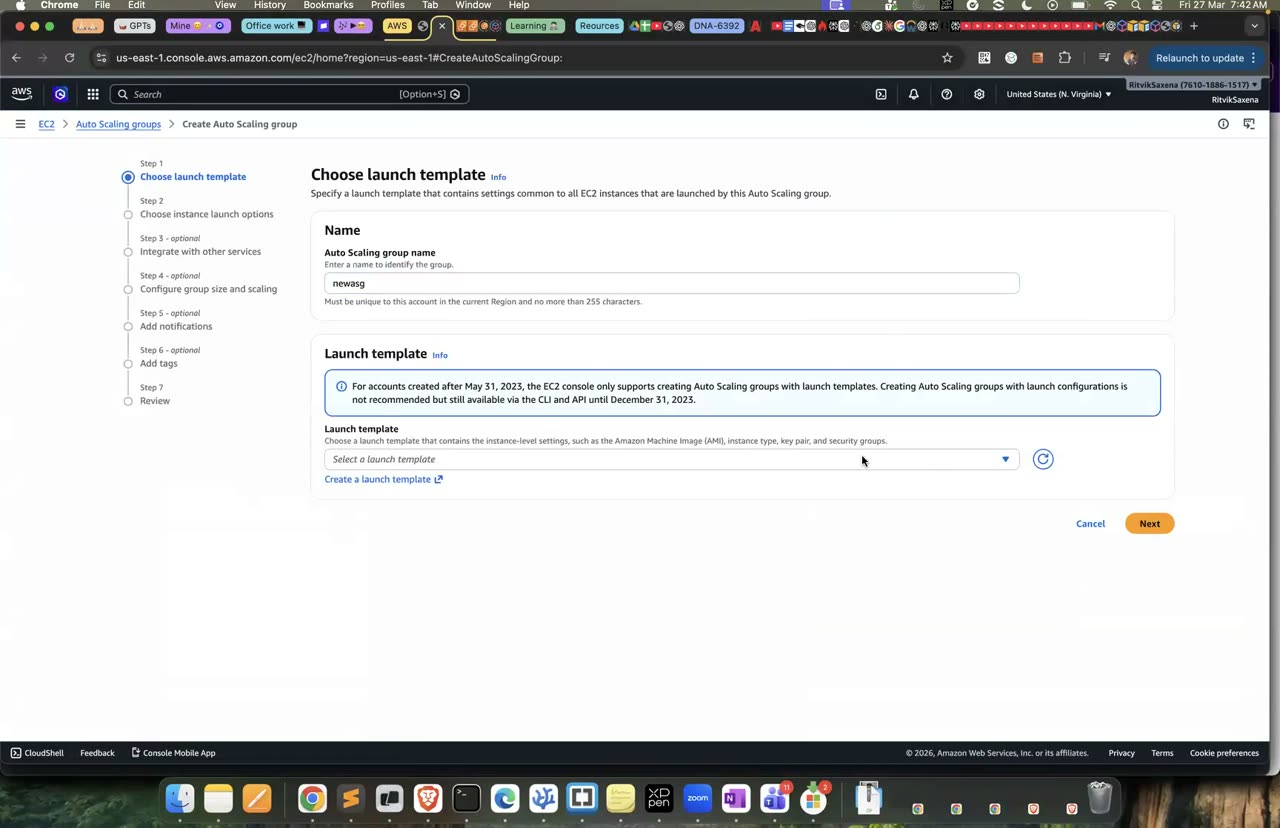
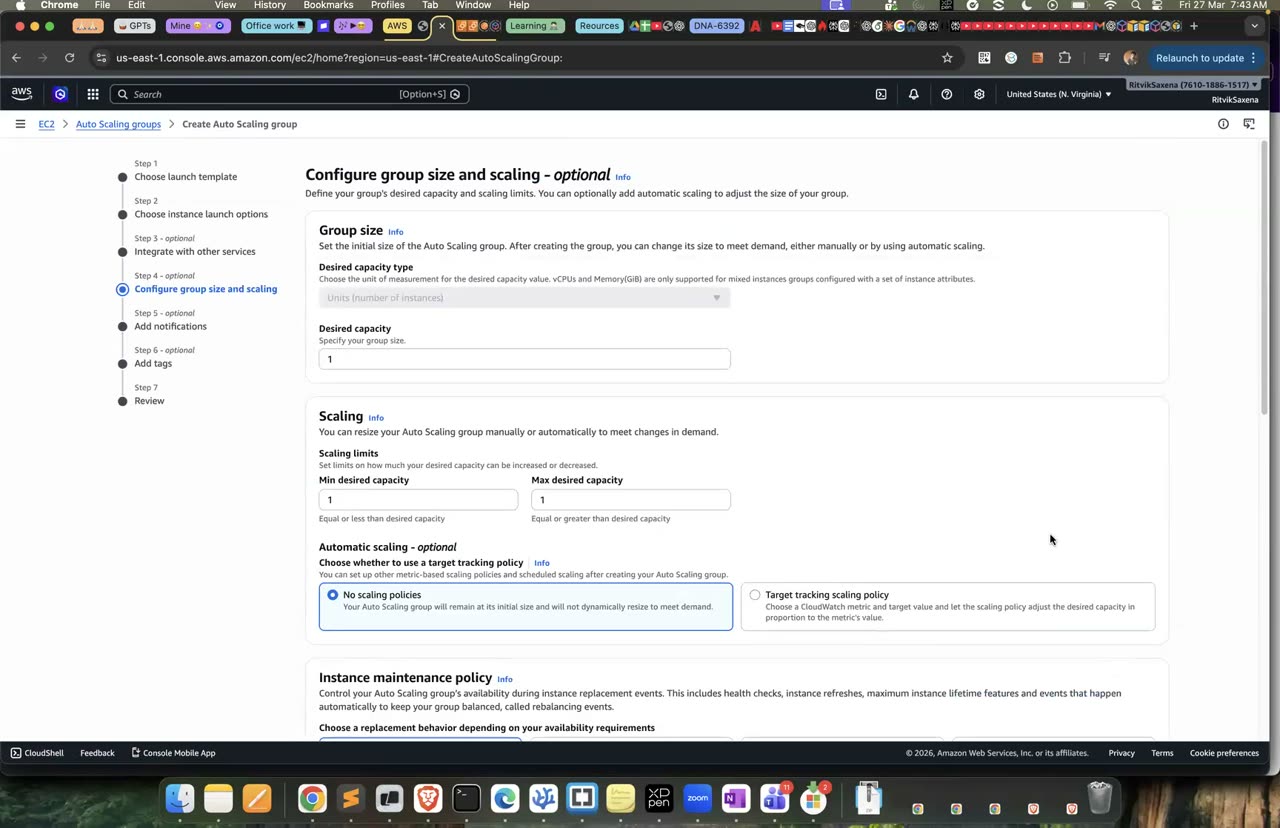
ALB banana aur launch-template se Auto Scaling group banana — poora flow L10/L11 mein hai.
Pehle hey install karo. Terminal 1 mein 8 minute tak 40 parallel connections se /work pe load daalo. Terminal 2 mein (pehle wahan bhi region aur ALB_DNS set karo) ek loop chalao, jo har 30 second mein ASG ki desired capacity aur instances ki ginti dikhata hai:
brew install hey
# terminal 1: load
hey -z 8m -c 40 http://$ALB_DNS/work

# terminal 2 (pehle: export AWS_DEFAULT_REGION=us-east-1): dekhte raho, har 30 sec
while true; do
  date +%T
  aws autoscaling describe-auto-scaling-groups --auto-scaling-group-names ha-blue \
    --query 'AutoScalingGroups[0].[DesiredCapacity,length(Instances)]' --output text
  sleep 30
done
Lagbhag 3–5 minute mein CPU 40% se upar jaayega aur CloudWatch alarm TargetTracking-ha-blue-AlarmHigh-... bajega. Desired capacity 2 se badh ke 3, 4 ya usse zyada ho jaayegi. ASG ke Activity tab mein "Launching a new EC2 instance ... in response to a target tracking alarm" jaisi lines dikhengi. Load band hone ke lagbhag 15 minute baad scale-in hoga, kyunki scale-in jaan-boojh ke dheere kiya jaata hai. hey ki summary mein latency distribution aur status codes dekho; scale-out ke dauraan bhi errors 0 ya bahut kam hone chahiye.
Yeh block ASG ke woh saare instances dhoondhta hai jo us-east-1a mein hain, aur unhe terminate kar deta hai, jaise wo AZ gir gaya ho. Phir 30 second tak har second ALB pe request bhej ke uska HTTP status code print kiya jaata hai:
IN_A=$(aws autoscaling describe-auto-scaling-groups --auto-scaling-group-names ha-blue \
  --query "AutoScalingGroups[0].Instances[?AvailabilityZone=='us-east-1a'].InstanceId" --output text)
echo "terminating AZ-a instances: $IN_A"
[ -n "$IN_A" ] && aws ec2 terminate-instances --instance-ids $IN_A >/dev/null
for i in $(seq 1 30); do curl -s -o /dev/null -w "%{http_code} " http://$ALB_DNS/; sleep 1; done; echo
Saare jawab 200 hone chahiye. ALB ne unhealthy targets ko hata diya aur baaki AZs ne traffic sambhal liya, aur ASG ne naye instances launch kiye (Activity tab mein dekho). Asli AZ failure mein, agar us AZ mein launch fail hota hai, toh ASG doosre AZs mein capacity badha deta hai.
Pehle "green" target group banta hai, aur launch template ke version 2 (v2 app) se ha-green ASG banta hai. Phir green targets ki health dekhi jaati hai; 2–3 minute mein dono healthy ho jaane chahiye.
Uske baad set_weights function banaya jaata hai. Yeh listener ke forward action ko badal ke blue aur green ko diye gaye weights ke hisaab se traffic baantta hai. Phir 5 second ruk ke 100 requests bhejta hai aur ginta hai ki kitni v1 se aayi aur kitni v2 se.
Function teen baar chalta hai: 90/10 (canary), 0/100 (poora cutover) aur 100/0 (rollback).
GREEN_TG=$(aws elbv2 create-target-group --name ha-green-tg --protocol HTTP --port 80 --vpc-id $VPC \
  --health-check-path / --health-check-interval-seconds 10 --healthy-threshold-count 2 \
  --query 'TargetGroups[0].TargetGroupArn' --output text)
aws autoscaling create-auto-scaling-group --auto-scaling-group-name ha-green \
  --launch-template "LaunchTemplateName=ha-web,Version=2" --min-size 2 --max-size 6 --desired-capacity 2 \
  --vpc-zone-identifier "$(echo $SUBNETS | tr ' ' ',')" --target-group-arns $GREEN_TG \
  --health-check-type ELB --health-check-grace-period 90
# green healthy hone do (~2-3 min):
aws elbv2 describe-target-health --target-group-arn $GREEN_TG --query 'TargetHealthDescriptions[].TargetHealth.State'

set_weights() {  # blue-weight green-weight
  aws elbv2 modify-listener --listener-arn $LIS --default-actions \
    "[{\"Type\":\"forward\",\"ForwardConfig\":{\"TargetGroups\":[{\"TargetGroupArn\":\"$BLUE_TG\",\"Weight\":$1},{\"TargetGroupArn\":\"$GREEN_TG\",\"Weight\":$2}]}}]" >/dev/null
  sleep 5
  for i in $(seq 1 100); do curl -s http://$ALB_DNS/ | python3 -c "import sys,json; print(json.load(sys.stdin)['version'])"; done | sort | uniq -c
}
set_weights 90 10     # canary: ~90 v1, ~10 v2
set_weights 0 100     # full cutover
set_weights 100 0 # rollback — ek command, seconds mein- ALB kholo → Listeners tab → HTTP:80 listener select karo → Manage rule (ya default action Edit) → action Forward to mein "Forward to multiple target groups" chuno, ha-blue-tg aur ha-green-tg dono add karo, har ek ka Weight field mein number daalo (90/10, phir 0/100, phir 100/0) → Save. Change turant live hota hai, koi deploy nahi chahiye.
Rollback ke baad saari requests v1 se aayengi. Agar release ko pakka karna ho, toh set_weights 0 100 chalao, phir ha-blue ki desired capacity 0 karke use delete kar do. Asli pipelines mein yahi weights CodeDeploy ya CodePipeline se badle jaate hain, aur CloudWatch alarms bajne pe apne aap rollback hota hai (Lab 5 ka E3).
✓ Verification tests
curl http://ALB/alag-alag requests pe alag-alag instance aur AZ dikhata hai, aur instances ka port 80 sirf ALB SG se khula hai.- Load test ke dauraan desired capacity 2 se upar gayi, aur baad mein wapas 2 ho gayi.
- AZ-a ke instances terminate karne ke baad bhi saare jawab 200 aaye.
- 90/10, 0/100 aur 100/0 ke shifts mein ginti lagbhag ummeed ke mutabik rahi, aur koi request fail nahi hui.
- Session Manager se kisi ek instance pe
sudo systemctl stop appchalao. Target unhealthy ho jaayega, aur ELB health check ki wajah se ASG use terminate karke naya instance le aayega. Socho ki agar--health-check-type EC2hota toh kya hota: instance "running" hi dikhta aur kabhi badla nahi jaata. Isiliye ELB health check use kiya jaata hai. ha-app-sgka rule hata do. Saare targets unhealthy ho jaayenge, aur ALB "fail open" karega, yaani sab targets ko traffic bhejega, lekin connection nahi banega aur 504 aayega. Rule wapas laga do.
CPU ki jagah ALBRequestCountPerTarget (target: har instance pe 50 requests) ke aadhar pe scaling karo, aur dekho ki dono mein se kaunsa jaldi react karta hai. Saath mein scheduled scaling bhi jodo, jaise "har Friday shaam 6 baje (IST) min=4".
Yeh commands dono ASGs ko unke instances ke saath delete karti hain, ALB delete karti hain, ek minute ruk ke dono target groups aur launch template delete karti hain. Instances poori tarah terminate hone ke baad (2–3 minute) dono SGs delete kiye jaate hain:
aws autoscaling delete-auto-scaling-group --auto-scaling-group-name ha-blue --force-delete
aws autoscaling delete-auto-scaling-group --auto-scaling-group-name ha-green --force-delete
aws elbv2 delete-load-balancer --load-balancer-arn $ALB
sleep 60
aws elbv2 delete-target-group --target-group-arn $BLUE_TG
aws elbv2 delete-target-group --target-group-arn $GREEN_TG
aws ec2 delete-launch-template --launch-template-name ha-web
# instances terminate hone ke baad (2-3 min):
aws ec2 delete-security-group --group-id $APP_SG && aws ec2 delete-security-group --group-id $ALB_SG
CloudWatch → Alarms mein TargetTracking-ha-* alarms ASG ke saath apne aap delete ho jaate hain; yeh confirm kar lo.